
uNLIMITED DIGITAL MARKETING SUPPORT AND TECHNOLOGY
Do you want access to the most powerful digital marketing solution available for your business? Unlock limitless growth potential with our comprehensive digital marketing solution and expert support
Fill out the form below to get started!
WHAT YOU'LL GET

Unlimited Support
Gain access to unlimited support coupled with expert guidance to navigate our marketing technology seamlessly. Never feel stranded again as our team stands ready to assist you at every turn.

Comprehensive CRM Integration
Easily centralize your contacts with our CRM integration, including automatic LinkedIn imports. Track interactions across all platforms for targeted engagement strategies.

Autonomous AI Agents
Deploy agents that go beyond chat to manage pipelines and trigger complex workflows. These digital workers execute multi-step tasks 24/7, ensuring no lead is missed while autonomously scaling your operations to meet every business goal.

Industry-Specific Snapshots & Prebuilt Tools
Our platform comes with pre-built, customizable snapshots by industry loaded with automations, templates, and tools so you have begin putting our system to work on day one.

Powerful Email Marketing Tools
Utilize our robust email marketing technology to craft engaging campaigns and automate follow-ups. Maximize audience engagement and conversion rates with powerful tools designed to deliver results.

Autonomous AI Engagement
Deploy 24/7 agents that handle complex conversations and lead nurturing. These systems autonomously sync with your CRM and execute follow-up workflows, turning inquiries into sales-ready opportunities without human intervention.

Limitless Marketing Reach with Funnels
Create unlimited marketing funnels and materials effortlessly with our intuitive interface and customizable templates. Scale your outreach efforts exponentially and capture leads with ease.
MARKETING TECHNOLOGY FEATURES
Social Media Scheduling: Schedule social media across all major channels and have unlimited recurring posts
CRM & Pipeline Management: Track leads, manage customer relationships, and monitor sales pipelines in one place.
Automated Follow-Ups: Create custom workflows for email, SMS, and call reminders to engage prospects effortlessly.
Smart Workflow Automation: Automate lead routing and pipeline updates using AI that triggers personalized follow-ups based on real-time prospect sentiment.
Custom Chatbots: Qualify leads and answer inquiries 24/7 with AI-powered chat solutions.
Multi-Channel Marketing: Run email campaigns, text messages (SMS), and social media ads from a single platform.
Landing Page Builder: Design high-converting pages with drag-and-drop tools and customizable templates.
Appointment Scheduling: Allow customers to book directly into your calendar with automated reminders.
Review Management: Generate, track, and respond to customer reviews to boost online reputation.
Payment Processing: Accept payments seamlessly through the platform.
Industry-Specific Marketing Tools
Our platform comes with pre-built, customizable snapshots ready to use.
Unlimited Integrations: Compatable with Make.com and Zapier for unlimited integrations and AI automations.
Call Tracking & Recording: Monitor call performance and record important conversations for training and analysis.
AI Booking Agents: Deploy autonomous agents to qualify leads and book meetings directly into your calendar via SMS and DM 24/7.
Analytics Dashboard: Access real-time reporting on campaign performance and business metrics, including advertising reporting via Meta and Google.
Membership & Course Hosting: Create and sell online courses or membership programs directly through the system.
Lead Nurturing Funnels: Build automated sequences to turn cold leads into loyal customers.
Unlimited Users: Add your entire team to collaborate without additional licensing fees.
Mobile App: Manage your business on the go with the iOS and Android mobile apps.
Dedicated Support: Get expert assistance to help you maximize platform features.
WHO IS THIS FOR?
This plan is ideal for any business owner or marketing team looking to elevate their marketing efforts to the next level.
Whether you're a startup seeking growth or an established enterprise aiming for expansion, our Unlimited Digital Marketing support and technology are tailored to meet your needs.
If you desire to upgrade your marketing strategies while having dedicated support every step of the way, this plan is perfect for you.

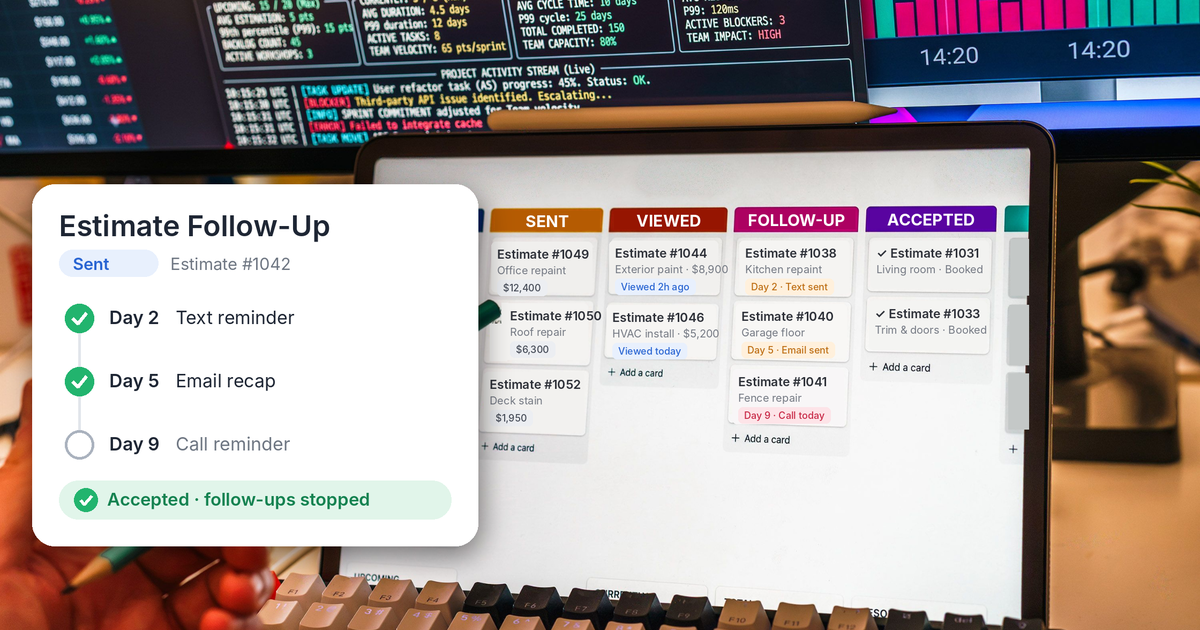
How to Build an Estimate Follow-Up Sequence in MarTech
Most estimates don't get turned down because of price. They go quiet. The customer gets busy, the email gets buried, and the job goes to whoever followed up first. The fix is a follow-up sequence that runs on its own every time you send an estimate.
With MarTech by Ajax Union, you can build that sequence once using workflows. It sends friendly reminders after an estimate goes out, and it stops the moment the customer accepts. This guide walks you through it step by step.
How the Sequence Works
You'll build two short workflows in app.ajaxunion.com:
The follow-up workflow starts when an estimate is sent. It waits a few days, sends a text, waits again, sends an email, and finally reminds your team to call.
The stop workflow starts when an estimate is accepted or declined. It removes the customer from the follow-up workflow so they never get a reminder about a job they've already decided on.
Both use the Estimates trigger, which can start a workflow based on an estimate's status. The statuses you can use are Sent, Viewed, Accepted, Declined and Invoiced.
Before You Start
Make sure you're sending estimates from app.ajaxunion.com, so the system can see their status.
Draft your follow-up messages first. Keep them short and helpful, not pushy. A reminder that offers to answer questions works better than one that asks for a decision.
Step 1: Create the Follow-Up Workflow
Log in at app.ajaxunion.com.
Go to Automation and click + Create Workflow, then choose to start from scratch.
Name the workflow something clear, such as Estimate Follow-Up.
Click Add New Trigger and choose Estimates from the list.
Give the trigger a name, such as Estimate Sent.
Click + Add Filters, choose Estimate Status, set the operator to Is, and select Sent.
Click Save.
You can add more filters to the same trigger. For example, add Estimate Value, Greater Than, and an amount to run a more personal sequence only for larger jobs.
Step 2: Add the Follow-Up Steps
Now add the actions that run after the trigger. Here's a simple rhythm that works for most service businesses:
Wait 2 days. Add a Wait action set to 2 days.
Send a text. Add a Send SMS action. For example: "Hi {{contact.first_name}}, just checking that you received your estimate. Happy to answer any questions!"
Wait 3 days. Add another Wait action.
Send an email. Add a Send Email action that recaps what's included in the estimate and how to accept it.
Wait 4 days. Add one more Wait action.
Remind your team to call. Add an Internal Notification or task action so someone on your team picks up the phone. A personal call is often what closes the job.
The {{contact.first_name}} code is a merge field. It fills in each customer's name automatically. See our guide to merge fields for more options.
Step 3: Create the Stop Workflow
This workflow makes sure nobody gets a reminder after they've already said yes or no.
Go back to Automation and click + Create Workflow.
Name it Estimate Accepted or Declined – Stop Follow-Up.
Add the Estimates trigger with the filter Estimate Status Is Accepted.
Add a second Estimates trigger with the filter Estimate Status Is Declined.
Add a Remove from Workflow action and select your Estimate Follow-Up workflow.
If you like, add a thank-you text or email for accepted estimates, or a Create Opportunity action so the new job lands in your pipeline.
Click Save.
Step 4: Publish and Test
Switch both workflows from Draft to Publish and save them.
Send a test estimate to yourself or a team member.
Check that the contact enters the follow-up workflow.
Accept the test estimate and confirm the contact is removed from the follow-up workflow.
Tips for Follow-Ups That Win Jobs
Use the Viewed status. A separate workflow that starts when an estimate is Viewed lets you reach out while the customer is thinking about it. Wait a few hours, then send a short note offering to talk it through.
Match the tone to the job. A quick text suits a small repair. A larger project may deserve a personal email and a call.
Don't overdo it. Three or four touches over about ten days is plenty. After that, move the contact into a longer-term newsletter instead.
Never Let an Estimate Go Quiet Again
A follow-up sequence means every estimate gets the same attention, even on your busiest weeks. Build it once in app.ajaxunion.com, and let it do the chasing while you do the work.
Want to see MarTech in action? Book a live demo and our team will walk you through it.

HOW MUCH IS IT?
Our monthly subscription is just $249*, providing you with unlimited access to all features and support without any hidden fees. Try it FREE for 7 days!
Enjoy the flexibility to cancel or upgrade your subscription at any time, ensuring you get the most value out of your investment in comprehensive digital marketing support and cutting-edge technology.
*Some features have usage-based fees - learn about them here.
WATCH NOW
Unlimited Digital Marketing
Marketing Automation Workshop Replay
Learn how our software can help you start nurturing your prospects and grow your business from the top of the funnel to the bottom line.
In this video you’ll learn:
Easy ways to organize your contacts and communicate better.
Simple methods for creating and handling social media posts.
Time-saving automation to make nurturing leads easier.
Ways to manage reviews and boost your company's reputation.
TAKE THE NEXT STEP TOWARDS DIGITAL MARKETING SUCCESS
Ready to revolutionize your marketing efforts?
Fill out the form below to access unlimited support, cutting-edge technology, and expert guidance.
Get started today for $249/mo or $2,490/yr with a FREE 7-day trial.
Additional Resources
Authority Blueprint
In this highly personalized process, we create an optimized LinkedIn marketing strategy for you, optimize your LinkedIn profile, and produce a calendar of content ideas for you to update your LinkedIn on a daily basis—complete with copy to get you started!
evyAI LinkedIn Assistant
Enhance your LinkedIn™ presence with evyAI,
a Chrome extension and a web app that supports your LinkedIn™ activities.
Create Personas, generate ideas, craft posts and 10x your LinkedIn™ exposure and productivity.
Monthly Strategy Session
Join our free monthly strategy session to get expert feedback on your current B2B marketing approach. Learn actionable ways to attract more leads and generate high-quality referrals.