
uNLIMITED DIGITAL MARKETING SUPPORT AND TECHNOLOGY
Do you want access to the most powerful digital marketing solution available for your business? Unlock limitless growth potential with our comprehensive digital marketing solution and expert support
Fill out the form below to get started!
WHAT YOU'LL GET

Unlimited Support
Gain access to unlimited support coupled with expert guidance to navigate our marketing technology seamlessly. Never feel stranded again as our team stands ready to assist you at every turn.

Comprehensive CRM Integration
Easily centralize your contacts with our CRM integration, including automatic LinkedIn imports. Track interactions across all platforms for targeted engagement strategies.

Autonomous AI Agents
Deploy agents that go beyond chat to manage pipelines and trigger complex workflows. These digital workers execute multi-step tasks 24/7, ensuring no lead is missed while autonomously scaling your operations to meet every business goal.

Industry-Specific Snapshots & Prebuilt Tools
Our platform comes with pre-built, customizable snapshots by industry loaded with automations, templates, and tools so you have begin putting our system to work on day one.

Powerful Email Marketing Tools
Utilize our robust email marketing technology to craft engaging campaigns and automate follow-ups. Maximize audience engagement and conversion rates with powerful tools designed to deliver results.

Autonomous AI Engagement
Deploy 24/7 agents that handle complex conversations and lead nurturing. These systems autonomously sync with your CRM and execute follow-up workflows, turning inquiries into sales-ready opportunities without human intervention.

Limitless Marketing Reach with Funnels
Create unlimited marketing funnels and materials effortlessly with our intuitive interface and customizable templates. Scale your outreach efforts exponentially and capture leads with ease.
MARKETING TECHNOLOGY FEATURES
Social Media Scheduling: Schedule social media across all major channels and have unlimited recurring posts
CRM & Pipeline Management: Track leads, manage customer relationships, and monitor sales pipelines in one place.
Automated Follow-Ups: Create custom workflows for email, SMS, and call reminders to engage prospects effortlessly.
Smart Workflow Automation: Automate lead routing and pipeline updates using AI that triggers personalized follow-ups based on real-time prospect sentiment.
Custom Chatbots: Qualify leads and answer inquiries 24/7 with AI-powered chat solutions.
Multi-Channel Marketing: Run email campaigns, text messages (SMS), and social media ads from a single platform.
Landing Page Builder: Design high-converting pages with drag-and-drop tools and customizable templates.
Appointment Scheduling: Allow customers to book directly into your calendar with automated reminders.
Review Management: Generate, track, and respond to customer reviews to boost online reputation.
Payment Processing: Accept payments seamlessly through the platform.
Industry-Specific Marketing Tools
Our platform comes with pre-built, customizable snapshots ready to use.
Unlimited Integrations: Compatable with Make.com and Zapier for unlimited integrations and AI automations.
Call Tracking & Recording: Monitor call performance and record important conversations for training and analysis.
AI Booking Agents: Deploy autonomous agents to qualify leads and book meetings directly into your calendar via SMS and DM 24/7.
Analytics Dashboard: Access real-time reporting on campaign performance and business metrics, including advertising reporting via Meta and Google.
Membership & Course Hosting: Create and sell online courses or membership programs directly through the system.
Lead Nurturing Funnels: Build automated sequences to turn cold leads into loyal customers.
Unlimited Users: Add your entire team to collaborate without additional licensing fees.
Mobile App: Manage your business on the go with the iOS and Android mobile apps.
Dedicated Support: Get expert assistance to help you maximize platform features.
WHO IS THIS FOR?
This plan is ideal for any business owner or marketing team looking to elevate their marketing efforts to the next level.
Whether you're a startup seeking growth or an established enterprise aiming for expansion, our Unlimited Digital Marketing support and technology are tailored to meet your needs.
If you desire to upgrade your marketing strategies while having dedicated support every step of the way, this plan is perfect for you.


How to Launch a Website From a Template in MarTech
Getting a new website online takes more than picking a nice design. In MarTech by Ajax Union, launching a site comes down to five tasks done in the right order: create, customize, connect, assign, and publish. Follow that order and you avoid the most common launch headaches, like broken links, missing updates, and domain errors.
This guide walks you through each step, then gives you a final checklist to run before you share your site with the world.
What does "launching" a website mean?
Launching moves your website from a private draft to a live site that visitors can reach at your own web address.
Two buttons matter here:
Save stores your latest changes but does not change what visitors see.
Publish takes your saved version and makes it live.
Why follow a launch process?
A clear path: you finish each task in the right order instead of jumping back and forth.
Safer updates: you review changes before anyone else sees them.
A branded address: your site runs on your own domain or subdomain.
Fewer surprises: you check your domain, pages, forms, and mobile layout before visitors do.
Before you begin
Gathering everything up front keeps setup moving. Make sure you have:
Access to the MarTech account that holds the website. You can log in at app.ajaxunion.com.
Your logo, images, written content, and the pages you need.
A domain, bought through MarTech or another domain provider.
Login access to your domain provider's DNS settings, in case you need to connect manually.
A decision on whether to use a root domain (such as example.com) or a subdomain (such as www.example.com).
A chosen homepage and the URL paths for your other pages.
Good to know: DNS changes can take up to 24 hours to update. Once your domain is connected and its DNS records are verified, MarTech sets up SSL (the padlock in the browser) automatically.
Step 1: Create the website
This step sets up the design and page structure you will build on.
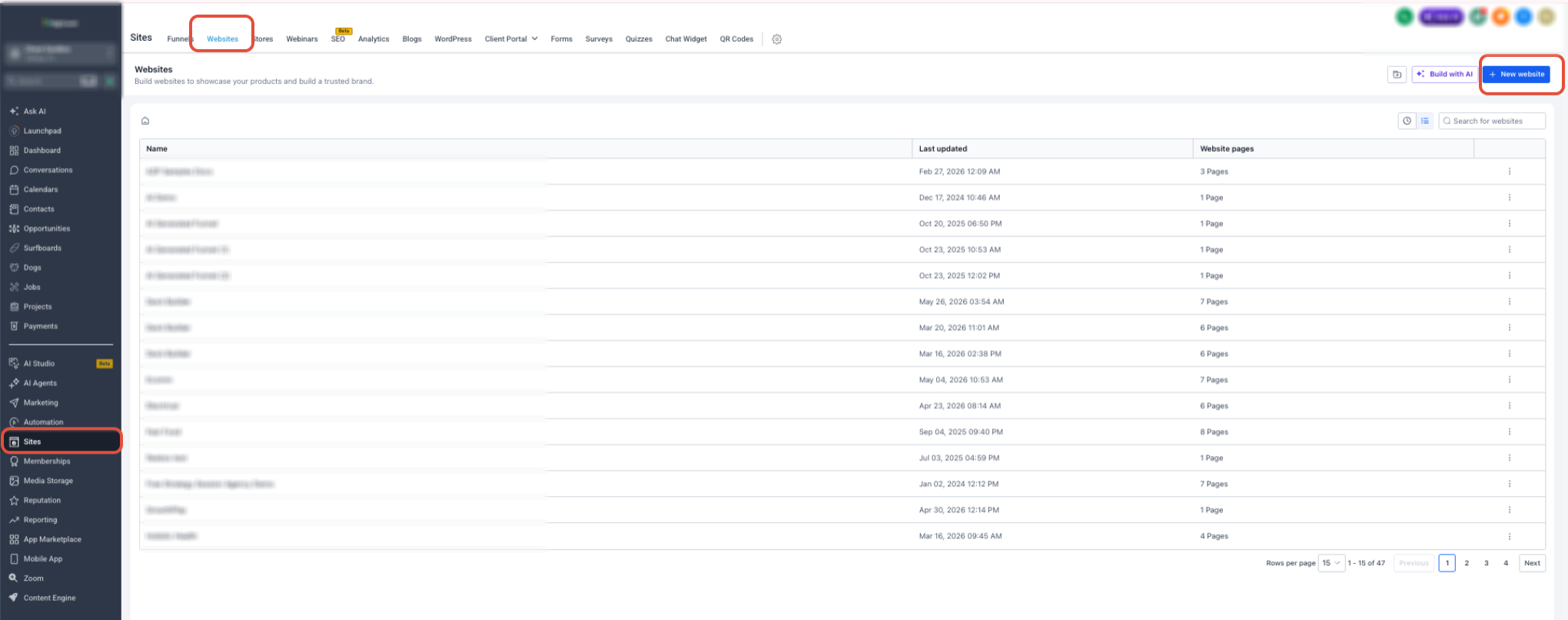
Go to Sites → Websites.
Click + New Website.
Choose how to start:
From Blank to build from scratch.
From Templates to start with a ready-made design.
Enter a name for the website.
Click Create.
If you chose a template, preview the options and select the design you like.
Step 2: Customize and save the website
Polishing your pages before connecting a domain keeps unfinished content away from visitors.
Open each page in the Website Builder.
Update the text, images, colors, navigation, buttons, forms, and other elements.
Check that every navigation link goes to the right page.
Review both the desktop and mobile layouts.
Click Preview to test the page the way a visitor would.
Add a page title and meta description in the page's SEO settings.
Click Save.
Remember: saving does not update your live website. Your changes only go live when you click Publish in Step 5.
Step 3: Connect your domain
Connecting your domain lets MarTech confirm that your web address points to the right place.
Exit the Website Builder.
Open the website's Settings tab.
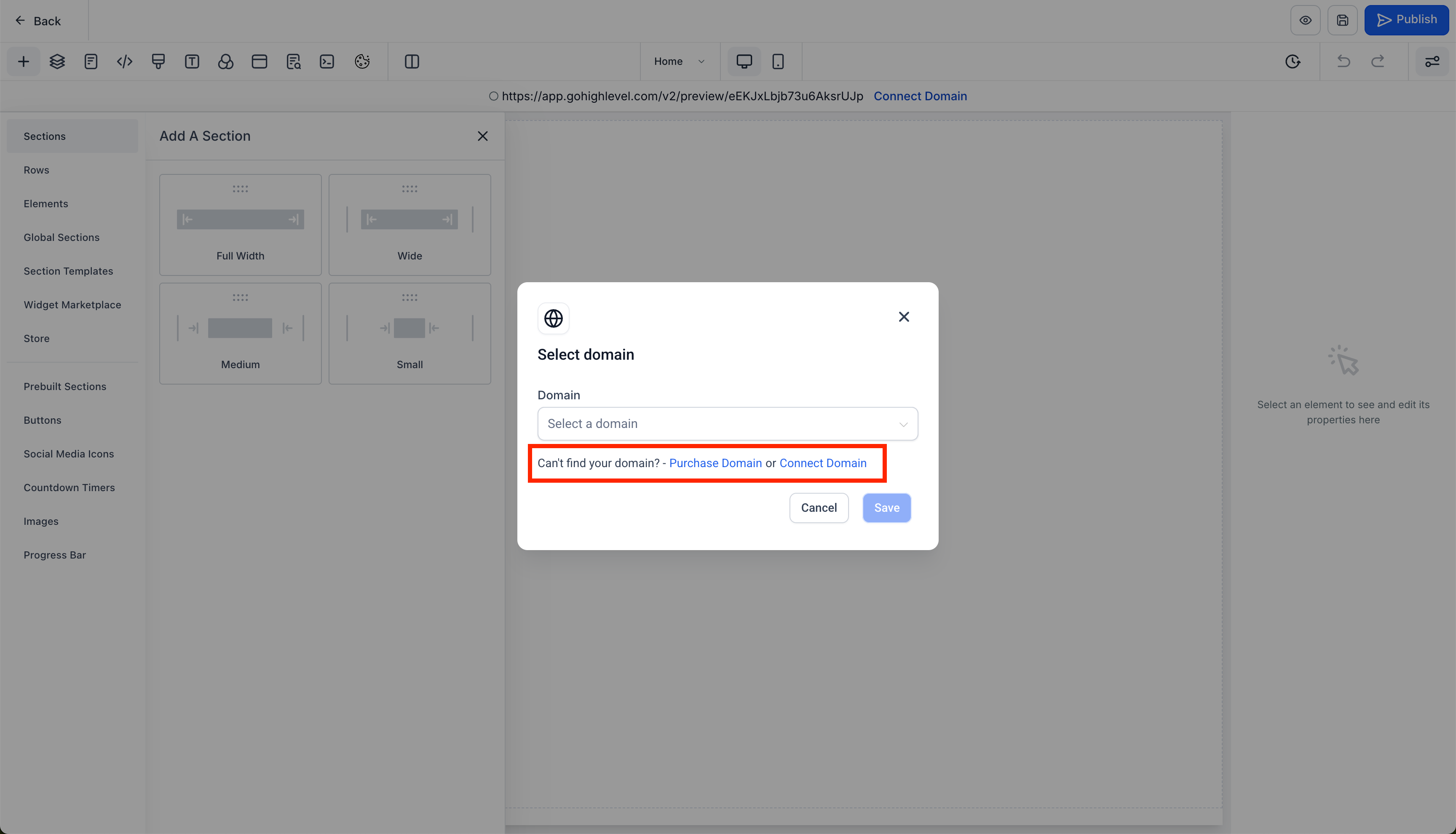
Under Domain, click Connect Domain.
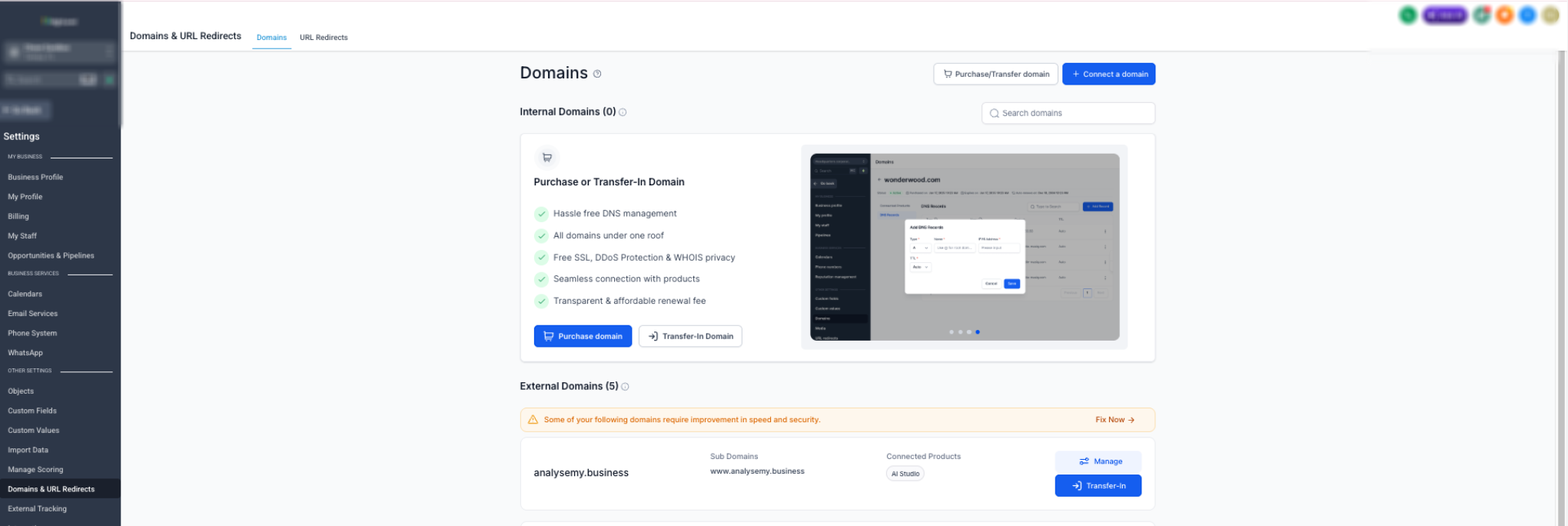
If the Domains page opens, click + Connect a domain.
Click Connect next to Funnel/Website/Store/Blog/Webinar.
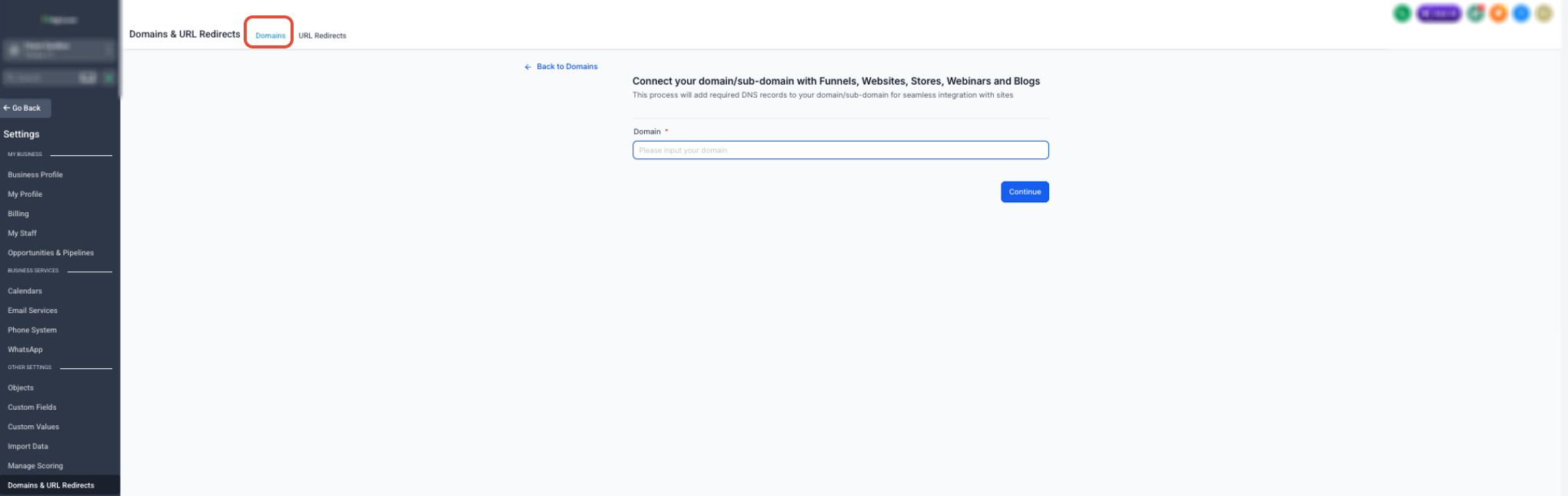
Enter the root domain or subdomain your visitors will use.
Click Continue.
Finish the connection using the option MarTech offers:
Automatic connection: sign in to your supported domain provider and allow MarTech to add the required records for you.
Manual connection: copy the DNS records MarTech shows you and add them at your domain provider.
Wait until the domain shows as connected or verified.
Using Cloudflare? Set the website's A or CNAME record to DNS only, not Proxied.
Domain still pending? Give it up to 24 hours. After that, compare each record against the values MarTech provided and remove any conflicting records.
Step 4: Assign the domain to your website
Assigning the domain links your verified address to this specific website.
Go back to Sites → Websites.
Open your website.
Select the Settings tab.
Open the Domain dropdown.
Select your connected domain.
Review the Path:
Keep a path such as /services if the site should open at example.com/services.
Set your homepage as the domain's default page if the site should open directly at example.com.
Scroll to the bottom and click Save.
[SCREENSHOT NEEDED: Domain dropdown and Path field in website Settings]
Step 5: Publish the website
Publishing makes your latest saved version live on your domain.
Go back to the Website Builder.
Preview the page one last time.
Click Save.
Click Publish.
Publish every page that should be available on the live site.
Final launch checklist
Open your site in a private or incognito browser window. This shows exactly what visitors see, without saved data or your logged-in MarTech session getting in the way.
Your domain shows as Connected, Verified, or Active in MarTech.
The public URL opens in a private or incognito window.
The site loads over https:// with no security warning.
The correct homepage appears, not a 404 page.
The root and www versions of your domain behave the way you intended.
Navigation links and buttons go to the correct pages.
Forms, calendars, popups, and checkout elements work, if you use them.
A test form submission creates the expected record or notification.
Desktop and mobile layouts look right.
Your latest published content appears on the live site.
No placeholder text, template images, test prices, or broken links remain.
Frequently asked questions
Why is my live site still showing old content? Your changes were probably saved but not published. Open the page, click Publish, and check the URL again in a private window.
Why is my domain still pending? DNS may still be updating, or a record may not match what MarTech provided. Wait up to 24 hours, then double-check the record type, host, and value.
Why does my site show an SSL or privacy warning? Look for incorrect or conflicting DNS records, and make sure any Cloudflare records are set to DNS only. Once the records are fixed, allow time for MarTech to issue the SSL certificate.
Why does my domain open a 404 page? Check that the domain is assigned to the right website, the page you want is published, and the default page or URL path is set correctly.
What if automatic domain connection isn't available? Use the manual option instead, and add the exact DNS records MarTech displays at the company that manages your domain.
Do I need to verify a domain I bought through MarTech? No. Domains purchased through MarTech are verified automatically. You can set them up under Settings → Domains → Purchased Domains.
Ready to go live?
Following these five steps, and running the checklist before you share your link, gives your new website a smooth, professional launch.
Want to see MarTech in action? Book a live demo and our team will walk you through it.

HOW MUCH IS IT?
Our monthly subscription is just $249*, providing you with unlimited access to all features and support without any hidden fees. Try it FREE for 7 days!
Enjoy the flexibility to cancel or upgrade your subscription at any time, ensuring you get the most value out of your investment in comprehensive digital marketing support and cutting-edge technology.
*Some features have usage-based fees - learn about them here.
WATCH NOW
Unlimited Digital Marketing
Marketing Automation Workshop Replay
Learn how our software can help you start nurturing your prospects and grow your business from the top of the funnel to the bottom line.
In this video you’ll learn:
Easy ways to organize your contacts and communicate better.
Simple methods for creating and handling social media posts.
Time-saving automation to make nurturing leads easier.
Ways to manage reviews and boost your company's reputation.
TAKE THE NEXT STEP TOWARDS DIGITAL MARKETING SUCCESS
Ready to revolutionize your marketing efforts?
Fill out the form below to access unlimited support, cutting-edge technology, and expert guidance.
Get started today for $249/mo or $2,490/yr with a FREE 7-day trial.
Additional Resources
Authority Blueprint
In this highly personalized process, we create an optimized LinkedIn marketing strategy for you, optimize your LinkedIn profile, and produce a calendar of content ideas for you to update your LinkedIn on a daily basis—complete with copy to get you started!
evyAI LinkedIn Assistant
Enhance your LinkedIn™ presence with evyAI,
a Chrome extension and a web app that supports your LinkedIn™ activities.
Create Personas, generate ideas, craft posts and 10x your LinkedIn™ exposure and productivity.
Monthly Strategy Session
Join our free monthly strategy session to get expert feedback on your current B2B marketing approach. Learn actionable ways to attract more leads and generate high-quality referrals.