
Unlimited Digital Marketing Blog
Make the most of your subscription with these helpful tips and resources, while unlocking the potential of digital marketing to gain valuable insights for unlimited growth.
Customizations & Advanced Features

Turn Structured Data Into Searchable Intelligence with Knowledge Base Tables
Turn Structured Data Into Searchable Intelligence with Knowledge Base Tables
Your AI Employee becomes significantly more powerful when it can reference structured data. With Knowledge Base Tables inside Unlimited Digital Marketing, you can upload CSV files and allow your AI Agents to search, interpret, and respond using real tabular data — all through natural conversation.
Instead of relying solely on documents or web pages, your AI can now understand customer lists, inventory records, transaction logs, KPIs, and more.
What Are Knowledge Base Tables?
Knowledge Base Tables allow you to upload CSV files directly into your AI Knowledge Base. Once uploaded, the system intelligently indexes each record so your AI Agents can answer questions about the data in plain English.
Rather than depending on keyword matches, the platform uses semantic search technology. This means your AI understands the meaning behind a question and returns context-aware results from the most relevant rows and columns.
For example, you can ask:
“Which customers have overdue invoices?”
“Show me orders that shipped overnight last week.”
“Which clients complained about billing?”
No formulas. No filters. No SQL queries required.
Why Use Knowledge Base Tables?
Natural-Language Data Queries
Ask everyday questions about your data and receive accurate, meaningful responses instantly.
Intelligent Semantic Matching
The system analyzes context and intent, not just exact words, to return the most relevant records.
Large Data Support
Upload CSV files with:
Up to 50,000 rows
Up to 500 columns
Up to 50 MB file size
Select the 20 most relevant columns for indexing
Structured Data Access
Tables allow your AI to reference structured information that traditional documents and webpages don’t capture effectively.
Enhanced AI Employee Capabilities
Empower your AI Agents to handle:
Customer records
Product catalogs
Order history
Financial metrics
Operational data
Internal reporting
How to Set Up Knowledge Base Tables
Follow these steps to connect your data:
Navigate to AI Agents → Knowledge Base.
Open an existing Knowledge Base or create a new one.
Click Add Source and choose Tables.
Upload your CSV file using drag-and-drop or file selection (maximum 50 MB).
Review the detected columns and adjust data types if needed.
Click Done to begin indexing. A progress indicator will show processing status.
Attach the Knowledge Base to your AI Agent (Chat, Voice, or Workflow AI).
Test with a sample question to confirm accurate results.
Once indexing is complete, your AI can immediately begin answering data-based questions.
CSV File Requirements
To ensure a successful upload, follow these guidelines:
File Format: .csv (UTF-8 encoding recommended)
Maximum Size: 50 MB
Row Limit: 50,000 rows per upload
Column Limit: 500 columns (choose up to 20 for indexing)
Header Row: The first row must contain column names
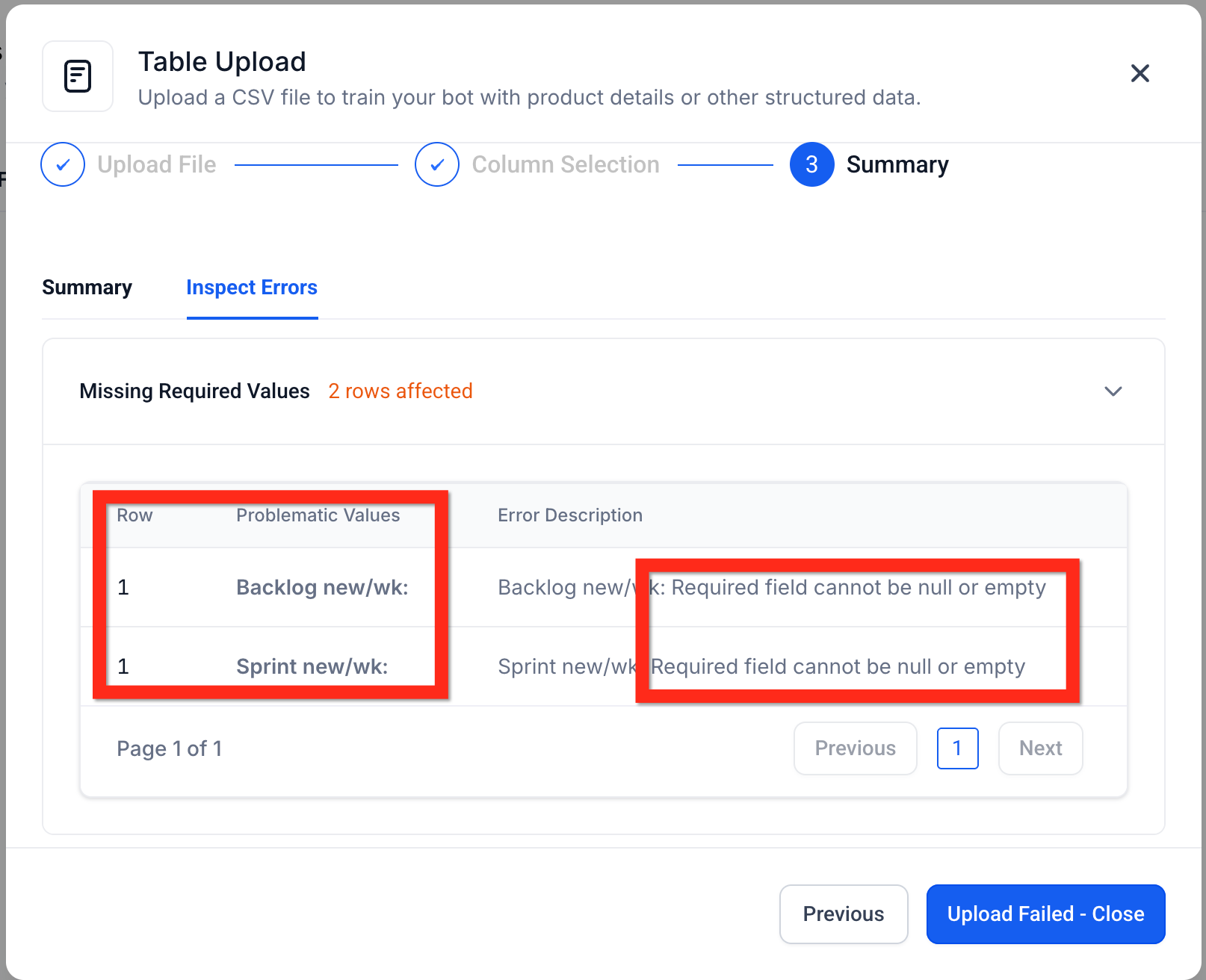
Clean Data: Remove empty values, merged cells, hidden formulas, and formatting artifacts
The system automatically detects column data types (text, number, date, etc.) with high accuracy. However, if a file is rejected, review it in a spreadsheet program or text editor to correct formatting issues before re-uploading.
How Semantic Search Works
Behind the scenes, each table row is converted into vector embeddings. This allows the AI to interpret meaning rather than match exact phrases.
When a user asks a question, the system compares it to indexed row groups and retrieves the most contextually similar matches. This process enables intelligent responses without requiring technical query language.
Smart Table Processing
To ensure speed and accuracy, the system:
Automatically detects column data types
Groups rows into optimized chunks for indexing
Stores metadata so responses can reference the correct records
Connects answers directly to the relevant data source
This architecture ensures your AI responses are both fast and verifiable.
Frequently Asked Questions
Can I upload Excel (.xlsx) files?
Excel files must be exported or saved as CSV format before uploading.
How long does indexing take?
Most files are processed within a few minutes. You’ll see a progress indicator during indexing.
Can I apply filters or sorting in questions?
Advanced filtering and sorting capabilities are expanding. For now, you can refine results by asking follow-up questions.
Can I see which rows were used in the answer?
Yes. Referenced records are displayed so you can verify or update them as needed.
Can I limit table access to certain AI Agents?
Yes. Only AI Agents connected to the Knowledge Base containing the table can access that data.
How is sensitive data protected?
Table data follows the same security rules as your Knowledge Base. Only authorized users and linked AI Agents can access or query the information.
Ready to Automate Smarter?
The Workflow AI Builder inside app.ajaxunion.com helps you eliminate guesswork, speed up automation setup, and scale your marketing systems efficiently.
If you don’t have an account yet, sign up for a free trial here:
👉 https://UnlimitedDigitalMarketing.com
Start building smarter automation today.
