
Unlimited Digital Marketing Blog
Make the most of your subscription with these helpful tips and resources, while unlocking the potential of digital marketing to gain valuable insights for unlimited growth.
Customizations & Advanced Features

How to Use Pipelines to Manage Your Sales Process in Unlimited Digital Marketing
f you've ever lost track of a lead, missed a follow-up, or wondered where a deal stood in your process — Pipelines are the fix. Inside Unlimited Digital Marketing, Pipelines give you a visual map of every opportunity moving through your sales or service workflow, so you always know what's happening, what's stalled, and what needs attention next.
This guide covers what Pipelines are, how to set them up, how to manage stages, and how to get the most out of them for your business.
What Are Pipelines?
A Pipeline is a visual workflow that tracks leads, deals, or clients as they move through a defined series of stages — from first contact all the way to closed or onboarded. Each item in a Pipeline is called an Opportunity, and it moves from left to right as it progresses through your process.
Pipelines give your team a shared, consistent view of where every opportunity stands — no spreadsheets, no guesswork, no leads falling through the cracks.
You can access Pipelines inside Unlimited Digital Marketing by navigating to Opportunities → Pipelines from your sub-account.
Why Pipelines Matter for Your Business
A well-built Pipeline does more than organize your leads. It gives you real operational clarity across your entire sales or service process.
Visibility — See at a glance where every opportunity is in your workflow at any moment.
Consistency — Standardize how leads and clients move through your process so nothing gets skipped.
Efficiency — Automate follow-ups, task assignments, and reminders based on stage changes so your team focuses on high-value work.
Performance tracking — Monitor conversion rates, spot bottlenecks, and measure pipeline health over time.
Understanding Pipeline Stages
A Pipeline is made up of stages — each one representing a step in your sales or customer journey. Stages should be clearly defined and action-oriented, so your team always knows exactly what needs to happen before moving an opportunity forward.
The key principle: every stage should have a clear entry condition. For example, an opportunity should only move to Appointment Scheduled once a meeting is actually confirmed on the calendar — not just requested.
Example — Sales Pipeline:
Lead Capture — New inquiries from forms, calls, or chats
Qualification — Budget, need, and fit are confirmed
Appointment Scheduled — Discovery calls or demos are booked
Proposal / Negotiation — Offers are shared and discussed
Closing — Opportunity marked as Won or Lost
Example — Service Business Pipeline:
New Inquiry
Discovery Call Booked
Service or Package Selected
Payment Collected
Onboarding
These structures can be adapted to fit any industry — real estate, coaching, agency work, home services, and more.
How to Access and View Your Pipelines
Log in to your account at app.ajaxunion.com.
From your sub-account, go to Opportunities.
Click on Pipelines.
The Pipelines List View shows all pipelines in your sub-account, the number of stages in each, and when each pipeline was last updated. From here you can open any existing pipeline or create a new one.
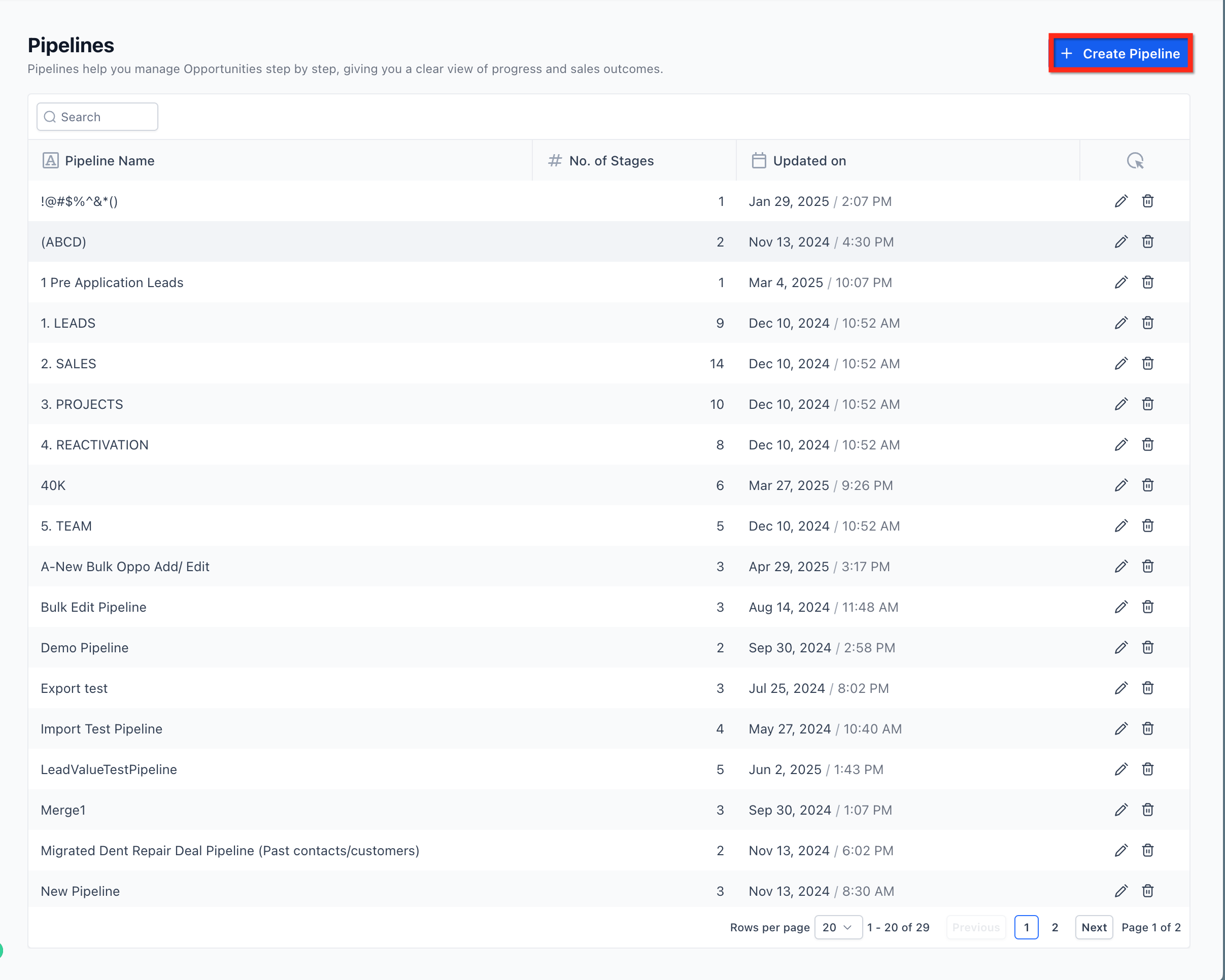
How to Edit a Pipeline and Its Stages
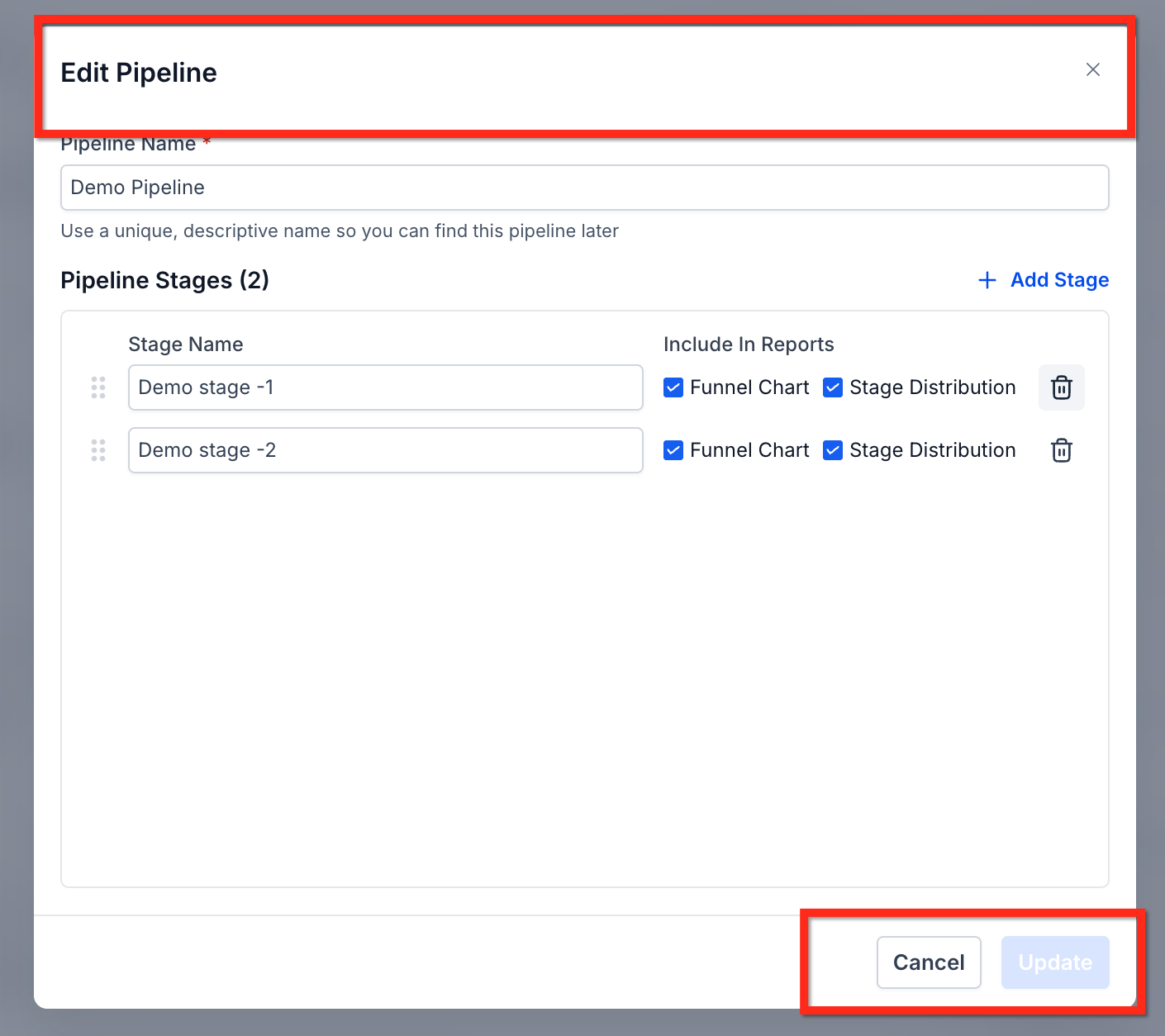
Inside any pipeline, you can rename stages, reorder them, control which stages appear in reporting, add new stages, or delete existing ones.
From the Pipelines list, open the pipeline you want to edit.
Use the stage editor to rename or reorder stages by dragging them into the right sequence.
Toggle reporting visibility on or off for individual stages as needed.
Click Save when your changes are complete.
Keep stage names short and action-oriented. Avoid vague labels like "In Progress" — instead use something specific like "Proposal Sent" or "Awaiting Signature" so anyone looking at the pipeline knows exactly where that opportunity stands.
How to Delete a Pipeline Stage Without Losing Opportunities
Removing a stage used to mean risking the loss of any opportunities sitting in it. That's no longer the case. When you delete a stage, you can now move all existing opportunities to another stage before the deletion is confirmed.
Navigate to Opportunities → Pipelines.
Open the pipeline you want to edit.
Click the delete icon next to the stage you want to remove.
Select a destination stage where existing opportunities should be moved.
Confirm the deletion.
All opportunities are automatically transferred to the stage you selected. Nothing is lost.
Best Practices for Building Effective Pipelines
Keep It Simple
Limit each pipeline to only the stages that reflect real decision points in your process. Too many stages create confusion and slow your team down. If a stage doesn't require a distinct action or decision, it probably doesn't need to exist.
Automate Smartly
Pipeline stages are powerful automation triggers inside Unlimited Digital Marketing. Use them to:
Send a follow-up message automatically when an opportunity has been in a stage for too long
Assign a task to a team member when a deal reaches a key stage
Trigger a notification when an opportunity is marked Won or Lost
Review Regularly
Set a recurring time — weekly or monthly — to:
Remove opportunities that are outdated or no longer active
Update stage definitions as your process evolves
Review conversion data to see where leads are dropping off
Use Data to Optimize
Pipelines aren't just organizational — they're analytical. Use pipeline reporting to answer questions like: which stage takes the longest to complete, where do opportunities drop off most often, and what's the win rate at each step? Let those answers drive how you refine your process over time.
Common Pipeline Structures by Industry
Your Pipeline structure should reflect how your business actually works. Here are a few starting points:
Real Estate: New Lead → Property Tour → Offer Made → Contract Signed → Closed
Coaching: Inquiry → Discovery Call → Program Selected → Payment → Onboarding
Agency: Lead → Strategy Call → Proposal → Agreement Signed → Client Onboarded
Start with the simplest version that covers your core workflow, then refine it as you learn where things slow down or fall through.
Frequently Asked Questions
Do I lose opportunities when I delete a pipeline stage?
No. When you delete a stage, you're prompted to choose a destination stage. All opportunities from the deleted stage are automatically moved there before the deletion is confirmed.
Can I have multiple pipelines in the same account?
Yes. You can create as many pipelines as you need — one for each service line, product, or client type. Each pipeline operates independently.
Can pipeline stage changes trigger automations?
Yes. Stage changes are one of the most powerful automation triggers available. You can build workflows that fire automatically whenever an opportunity moves into or out of any stage.
How many stages should a pipeline have?
There's no fixed number, but simpler is almost always better. Most effective pipelines have between four and eight stages. If you're finding it hard to decide which stage an opportunity belongs in, you probably have too many.
Can I reorder stages after a pipeline is already in use?
Yes. You can rename and reorder stages at any time from the pipeline editor. Reordering stages does not affect existing opportunities or automations.
Do automations built on pipeline stages keep working after I edit the pipeline?
Yes. Existing pipeline-based automations and triggers continue to function normally after edits. If you delete a stage that an automation references, review and update that automation to point to the correct stage.
Start Tracking Your Opportunities with Pipelines
A clear, well-structured Pipeline is one of the highest-leverage things you can build inside Unlimited Digital Marketing. It brings order to your sales process, makes follow-up automatic, and gives you the data you need to grow with confidence.
Log in to app.ajaxunion.com, go to Opportunities → Pipelines, and start building or refining your pipeline today. For more guides and platform tutorials, visit UnlimitedDigitalMarketing.com.
