
Unlimited Digital Marketing Blog
Make the most of your subscription with these helpful tips and resources, while unlocking the potential of digital marketing to gain valuable insights for unlimited growth.
How To Guides

Connect AI Agents to Your Workflows Seamlessly
The Ask AI integration inside app.ajaxunion.com allows you to connect your AI Agents directly into workflows, automation sequences, and business processes.
Instead of keeping your AI agents isolated, this feature enables you to trigger intelligent responses dynamically within your marketing and CRM automation. The result? Smarter workflows, personalized communication, and more efficient automation at scale.
What Is Ask AI Integration?
Ask AI allows you to call an AI Agent that you’ve built in Agent Studio and insert its response directly into a workflow action.
This means your automation can:
Generate AI-powered replies
Personalize messages dynamically
Analyze data and produce contextual responses
Trigger intelligent follow-ups
All without manual intervention.
How Ask AI Works
When building a workflow inside Unlimited Digital Marketing, you can add an Ask AI action.
Here’s what happens:
A workflow trigger activates (form submission, tag added, appointment booked, etc.)
The Ask AI action sends context or instructions to your selected AI agent
The AI agent processes the request
The generated response is returned to the workflow
The workflow uses that output in SMS, email, internal notes, or additional actions
This allows your automation to think and respond dynamically instead of relying on static templates.
Key Benefits of Ask AI Integration
Intelligent Personalization
Generate unique responses based on contact data, previous conversations, or custom prompts.
Dynamic Content Creation
Use AI to draft email replies, SMS responses, or follow-up messages inside automation.
Advanced Data Processing
Pass structured data into your AI agent and receive formatted outputs for decision-making.
Seamless Workflow Automation
Combine AI-generated outputs with triggers, conditions, delays, and CRM updates.
Scalable Communication
Automate high-quality, contextual responses across multiple contacts simultaneously.
How to Set Up Ask AI in a Workflow
Follow these steps to integrate Ask AI into your automation:
Log in to app.ajaxunion.com
Navigate to Automation → Workflows
Create a new workflow or edit an existing one
Add a new action step
Select Ask AI
Choose the AI Agent you want to use
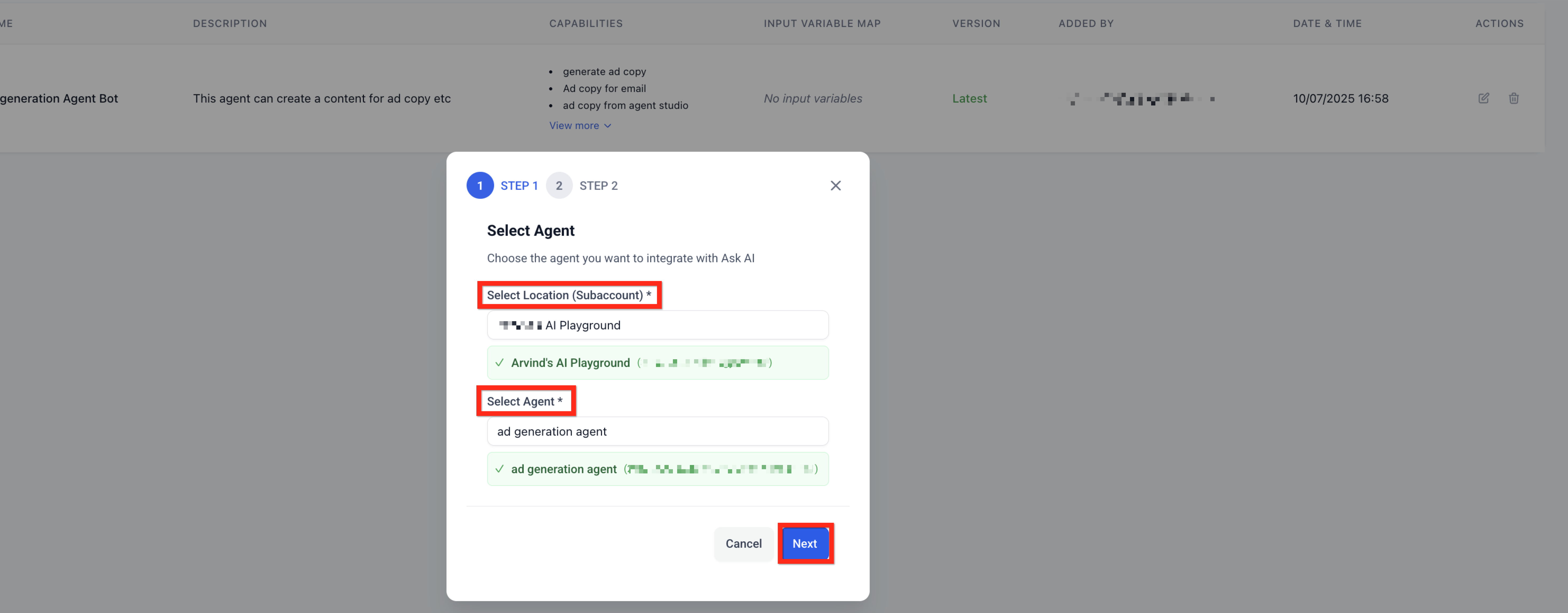
Enter your prompt or instructions
Map variables or contact fields if needed
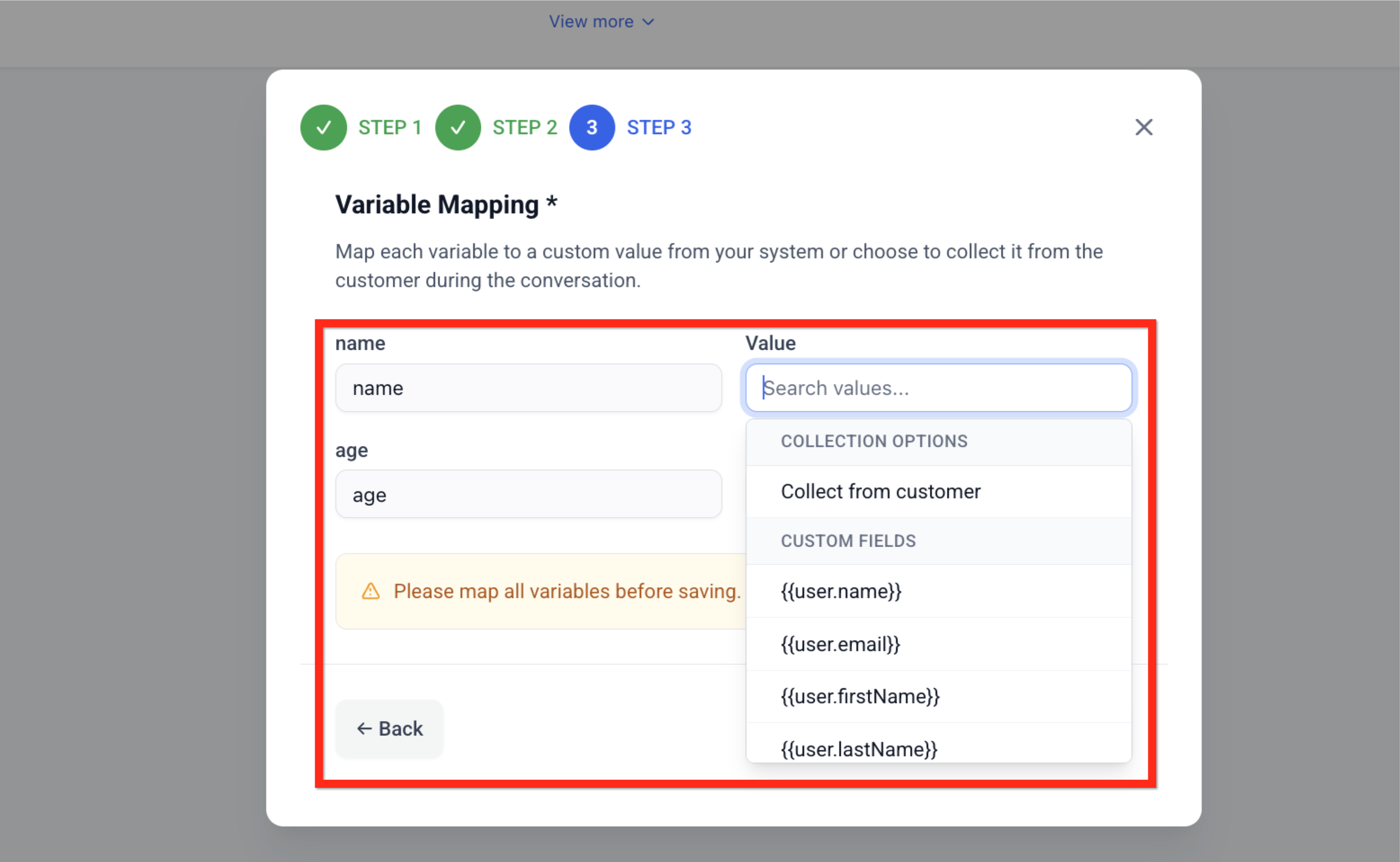
Save and test the workflow
Publish when ready
Once active, your workflow will automatically use the AI agent whenever triggered.
Best Practices for Better Results
Provide Clear Prompts
The more specific your instructions, the more accurate the AI output will be.
Example:
Instead of “Write a follow-up message,” use:
“Write a friendly SMS follow-up reminding the contact about their upcoming consultation tomorrow at 2 PM.”
Use Contact Data for Personalization
Insert dynamic fields such as name, appointment time, or service type for tailored responses.
Test Before Publishing
Always test in a staging or controlled environment to verify accuracy and tone.
Monitor Performance
Review conversations and refine prompts to improve quality over time.
Common Use Cases
Ask AI integration is ideal for:
Lead qualification responses
Appointment confirmations
Sales follow-up automation
Customer support replies
Review request messaging
Re-engagement campaigns
Internal CRM notes summarization
AI-powered data formatting
By embedding AI directly into workflows, you eliminate repetitive tasks while maintaining a personalized customer experience.
Why This Matters for Agencies
For agencies and growing businesses, Ask AI integration allows you to scale communication without sacrificing quality. Instead of manually crafting every follow-up message, AI handles intelligent responses while your workflows manage timing and logic.
This creates:
Faster response times
Higher engagement rates
Improved operational efficiency
Reduced manual workload
All within a unified automation system.
Build Smarter Workflows Today
The Ask AI integration inside Unlimited Digital Marketing connects your AI agents directly to your automation engine — giving your workflows intelligence, flexibility, and scalability.
If you don’t have an account yet, sign up for a free trial here:
👉 https://UnlimitedDigitalMarketing.com
Start automating with AI today.
