Unlimited Digital Marketing Blog
Make the most of your subscription with these helpful tips and resources, while unlocking the potential of digital marketing to gain valuable insights for unlimited growth.
Platform Navigation & Dashboard

How to Customize Social Media Posts for Each Platform
Social media success isn’t just about posting consistently — it’s about posting strategically. Each platform has its own audience behavior, character limits, and content style preferences. What works on LinkedIn may not perform the same way on Instagram or Facebook.
With Unlimited Digital Marketing’s Social Planner, you can tailor your message for every social channel — all from one centralized dashboard.
Why Customize Posts for Each Platform?
Different social networks have different expectations:
Character limits vary
Media formatting requirements differ
Audience tone and engagement styles change
Content length impacts performance
Instead of copying and pasting the same message everywhere, you can adapt your content to fit each platform perfectly — improving reach, engagement, and overall campaign effectiveness.
What Is the “Customize for Each Post” Feature?
The Customize for Each Post feature allows you to create platform-specific versions of a single post within one streamlined interface.
Key Benefits
Multi-Platform Posting
Select multiple social accounts (such as Facebook, Instagram, LinkedIn, and Google Business Profile) and manage them simultaneously.
Platform-Specific Messaging
Create unique captions tailored to each channel’s character limit, audience expectations, and tone.
Easy Toggle Control
Switch between universal content (one post for all platforms) and customized content (unique posts per platform) with a simple toggle.
AI-Powered Content Assistance
Generate or expand content using built-in AI tools. Adjust length and format depending on whether you need a short caption or a long-form post.
Advanced Scheduling
Publish immediately or schedule posts for a future date and time to keep your marketing consistent and automated.
Time-Saving Workflow
Eliminate the need to recreate posts multiple times across platforms while still maintaining customization.
How to Customize Posts for Each Social Channel
Follow these steps to create tailored posts inside the Social Planner:
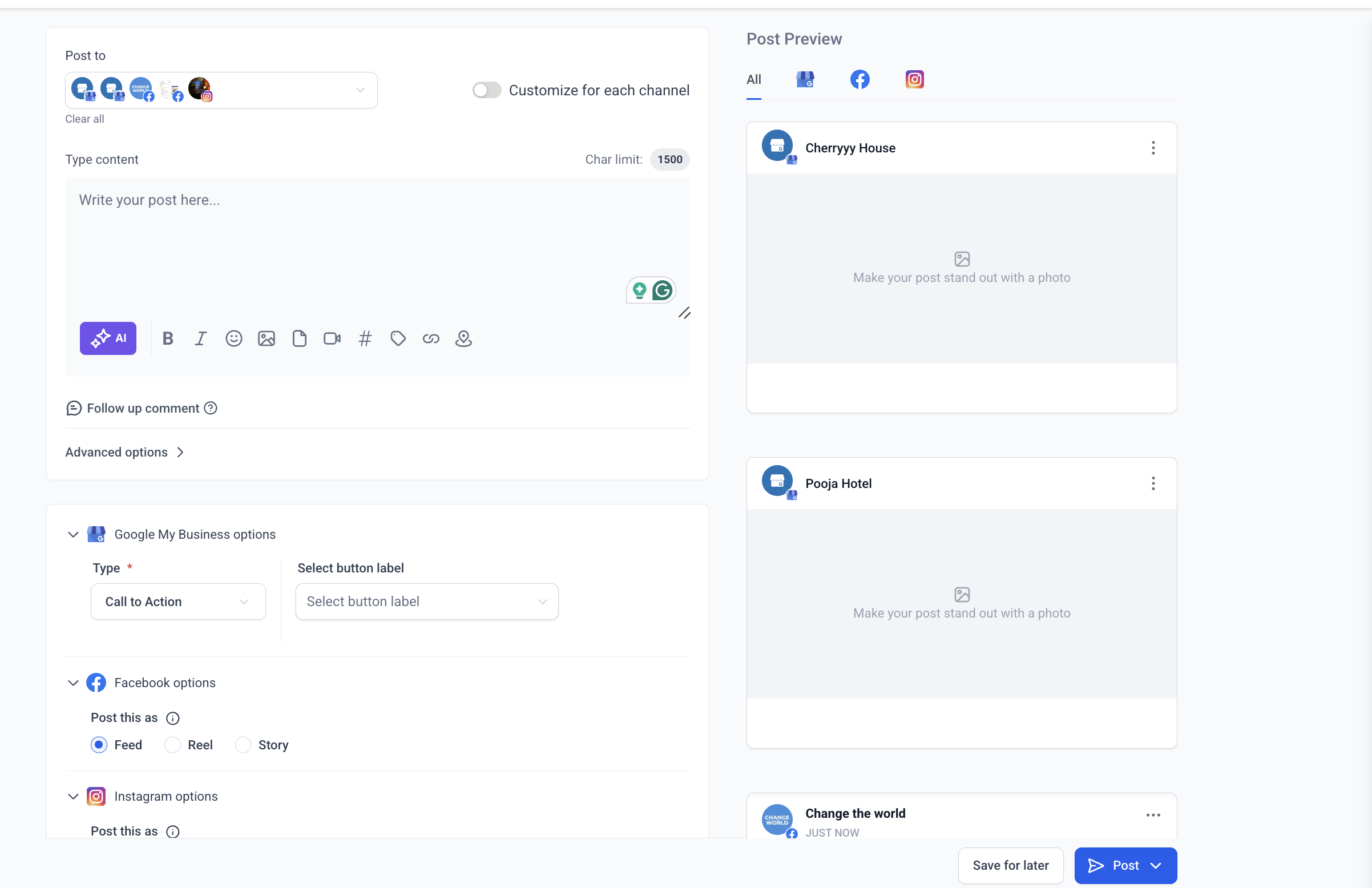
Step 1: Access the Social Planner
Navigate to the Marketing section in your dashboard
Select Social Planner

Click Create New Post
Step 2: Select Multiple Social Channels
Choose the platforms you want to publish to. Once more than one channel is selected, the customization option becomes available.

Step 3: Enable “Customize for Each Post”
Turn on the customization toggle. This allows you to create different versions of your content for each selected platform.
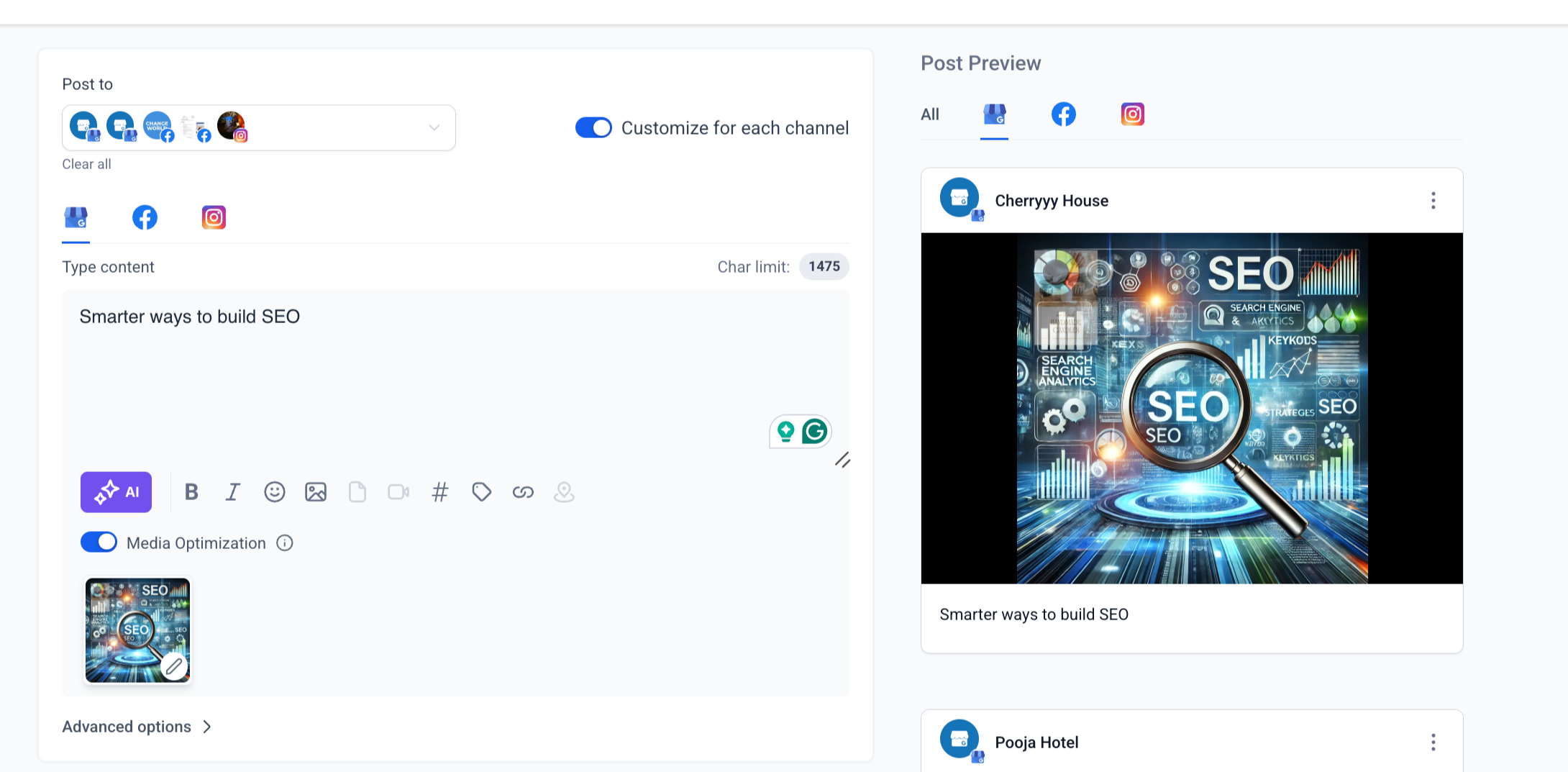
Step 4: Create Platform-Specific Content
Write unique captions for each channel, ensuring they align with character limits and platform style.
Step 5: Add Media
Upload images or videos where appropriate. Each platform may support different formats and sizes.
Important Notes:
Switching platforms while media is uploading may cancel the upload.
Turning the customization toggle on or off during upload can remove in-progress media.
Changing accounts while a video thumbnail is processing may require you to reapply the thumbnail.
Step 6: Use AI (Optional)
Leverage AI tools to generate fresh content or adjust your message length based on the platform.

Step 7: Schedule or Publish
Review your posts for each channel and either publish immediately or schedule them for later.
Reminder:
If you turn off the customization toggle after creating unique versions, the system will apply the active content to all selected platforms and customized versions will be removed.
Social Media Character Limits
When customizing posts, it’s important to stay within platform guidelines:
PlatformCharacter LimitFacebook Pages & Groups5,000Instagram2,200LinkedIn3,000Google Business Profile1,500
Staying within these limits ensures your post publishes correctly and maintains readability.
Frequently Asked Questions
What happens if my post exceeds the character limit?
If your content goes over the limit for a specific platform, you’ll need to edit it before publishing. The system provides character indicators to help you stay within the allowed range.
Why This Matters for Your Marketing Strategy
Customizing content for each platform improves:
Engagement rates
Content relevance
Brand voice consistency
Audience connection
Campaign performance
Instead of forcing one message to fit everywhere, you can optimize each post for maximum impact — all without increasing your workload.
With Unlimited Digital Marketing’s Social Planner, you gain the flexibility to manage diverse campaigns while maintaining efficiency and control.
Ready to Elevate Your Social Media Strategy?
The Social Planner inside app.ajaxunion.com gives you full control to customize every post for every platform — manage multiple channels, tailor messaging, schedule with precision, and streamline your entire content workflow from one dashboard.
Stop posting the same message everywhere. Start posting smarter.
If you don’t have an account yet, sign up for a free trial here:
👉 https://UnlimitedDigitalMarketing.com
Create platform-perfect content and maximize engagement today.
