
Unlimited Digital Marketing Blog
Make the most of your subscription with these helpful tips and resources, while unlocking the potential of digital marketing to gain valuable insights for unlimited growth.
Platform Setup & Configuration

How to Begin Using Funnels and Websites in app.ajaxunion.com
How to Begin Using Funnels and Websites in app.ajaxunion.com
If you're ready to capture leads, sell products, or build a professional online presence, Funnels and Websites inside app.ajaxunion.com give you everything you need.
Whether you're launching a landing page, building a multi-page website, or creating a high-converting funnel, this guide will walk you through how to get started the right way.
What Are Funnels and Websites?
Inside app.ajaxunion.com, you can build two types of online experiences:
Funnels
Funnels are structured, step-by-step page sequences designed for a specific goal — such as:
Capturing leads
Booking appointments
Selling products
Promoting an offer
Funnels guide visitors through a controlled journey. They also allow split testing, so you can test different page variations to see what converts best.
Example Funnel Flow:
Landing Page (Lead Capture)
Booking or Offer Page
Thank You Page
Funnels are ideal when you want a clear action and measurable results.
Websites
Websites are more flexible and are typically used for:
Business homepages
About pages
Service listings
Blog pages
Online stores
Unlike funnels, websites do not follow a strict sequence. Visitors can navigate freely between pages. Websites also allow you to build full eCommerce stores.
Should You Use a Funnel or a Website?
Use a Funnel if:
You want to run ads
You want a focused conversion goal
You want to A/B test pages
You are promoting a specific offer
Use a Website if:
You need a full business presence
You want multiple navigational pages
You are building an online store
You need brand authority pages
Both tools are powerful — the right choice depends on your goal.
How to Create a Funnel
Getting started is simple.
Step 1: Navigate to Funnels
Go to:
Sites → Funnels
Click New Funnel
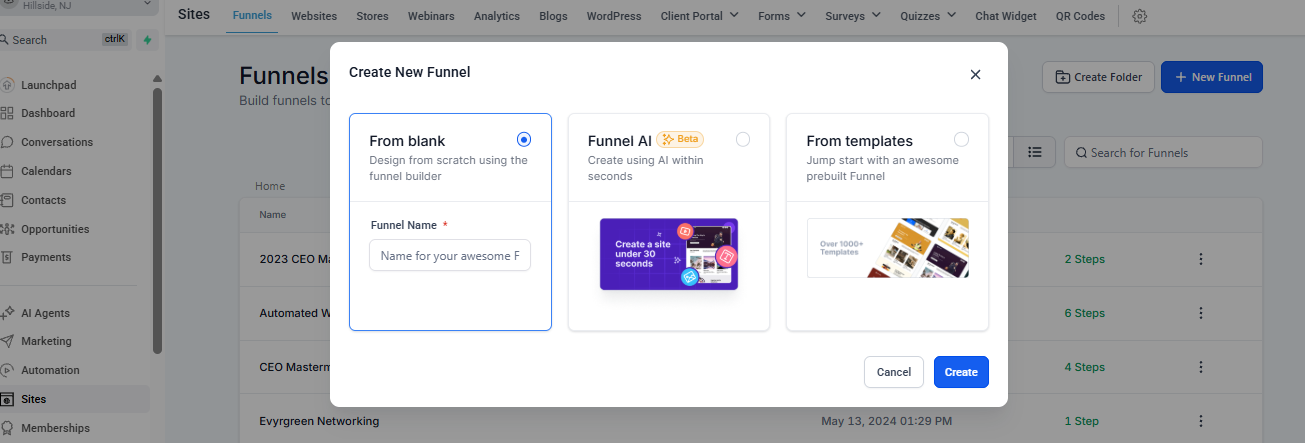
You’ll see three creation options:
From Blank (build from scratch)
From Template (use a pre-designed layout)
Funnel AI (generate with AI)
Option 1: Use a Template
Templates save time and give you professionally designed layouts.
Click New Funnel → From Template
Browse the Template Library
Preview your selected template
Click Continue
Customize inside the Funnel Editor
Click Save
Option 2: Use Funnel AI
Funnel AI allows you to generate a funnel based on your industry and preferences.
Select Funnel AI
Choose your business niche
Select design preferences
Generate your funnel
Edit and refine as needed
This is ideal if you want a fast starting point.
How to Create a Website
To build a website:
Navigate to Sites
Click New Website
Choose a template
Edit pages inside the Site Builder
Save and Publish
You can build:
Homepages
Service pages
Blogs
Product pages
Contact pages
Understanding the Site & Funnel Builder
Both Funnels and Websites use the same drag-and-drop builder.
Builder Structure Hierarchy:
Sections → Rows → Columns → Elements
You must have:
At least one Section
One Row
One Column
Then you can add Elements
Adding Elements
Click Add Element and drag items such as:
Headlines
Images
Videos
Forms
Calendars
Buttons
Order Forms
You can search elements using keywords for faster access.
Editing Elements
Click any object to open settings where you can adjust:
Text and styling
Colors
Alignment
Padding (space inside elements)
Margin (space outside elements)
Visibility (mobile or desktop only)
Mobile Optimization
You can switch between:
Desktop Mode
Mobile Mode
This allows you to:
Adjust layouts for smaller screens
Hide or show elements on mobile only
Create mobile-specific sections
Optimize spacing and alignment
Pro Tip: Design your desktop version first, then optimize for mobile.
Creating Forms for Lead Capture
Forms are essential for collecting contact information.
To create a form:
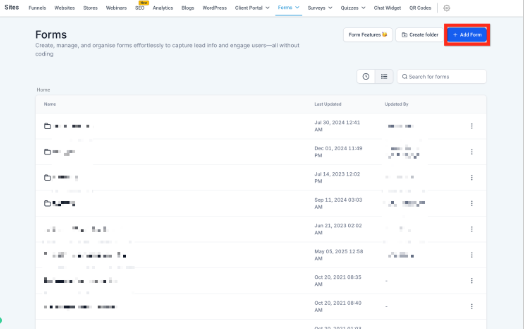
Open the Form Builder
Click Add Form
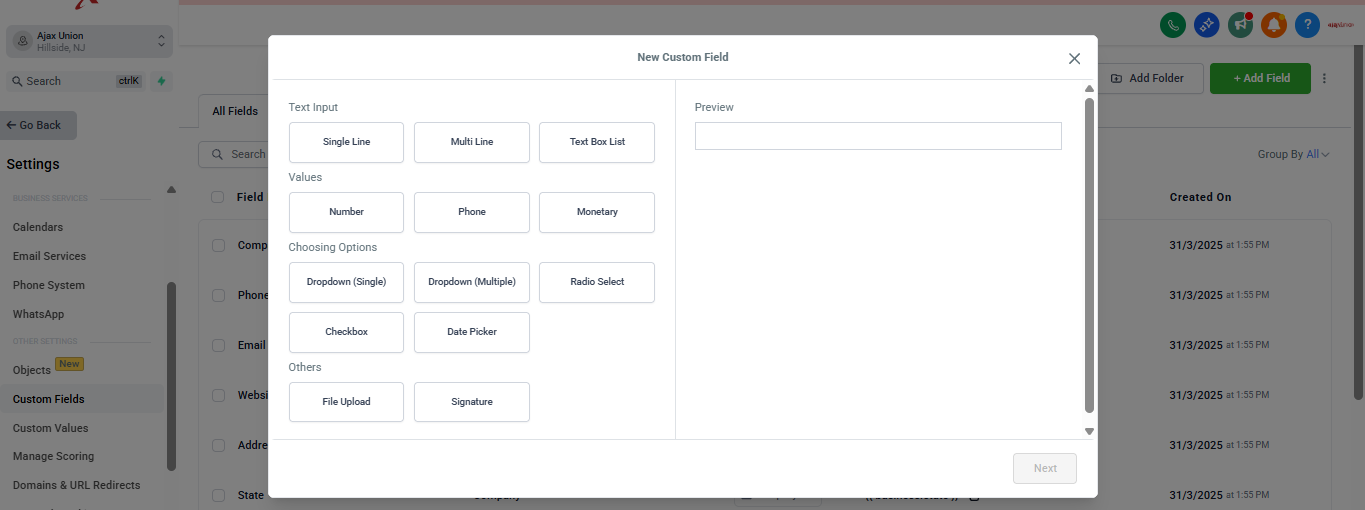
Customize fields
Save
Add it to your funnel or website page
You can connect forms to automations for instant follow-up.
Connecting a Domain
Before launching, you’ll need a custom domain.
To Connect a Domain:
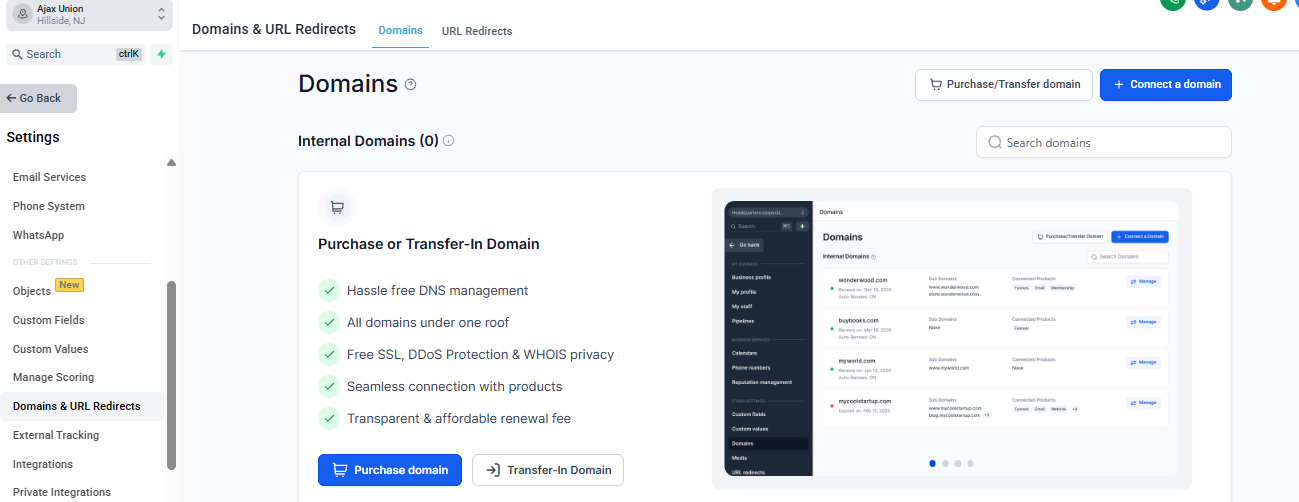
Go to Settings → Domains
Click Connect Domain
Enter your domain
Follow DNS setup instructions
Verify records
Attach the domain to your funnel or website
Using your own domain increases credibility and trust.
Publishing Your Funnel or Website
Inside the builder, you’ll see options to:
Save (unpublished version)
Preview (see live simulation)
Publish (make it live)
Only published changes are visible to visitors.
Tracking Performance
You can monitor:
Page views
Opt-ins
Sales
Revenue
This allows you to optimize performance over time.
When You’re Ready to Launch
Once your:
Pages are built
Forms are connected
Domain is attached
Mobile view is optimized
Click Publish and share your link.
You’re officially live.
Final Thoughts
Funnels drive focused conversions.
Websites build long-term authority.
Inside app.ajaxunion.com, you have the flexibility to use both — strategically.
Start simple. Improve continuously. Optimize based on performance data.
Your digital presence is now fully in your control.
Ready to Build Your First Funnel or Website?
The powerful builder inside app.ajaxunion.com lets you create high-converting funnels and professional websites — without coding.
Launch landing pages, capture leads, sell products, and grow your business from one unified platform.
If you don’t have an account yet, sign up for a free trial here:
👉 https://UnlimitedDigitalMarketing.com
Start building and launching today.
