Getting Started with Reviews AI Agents
Online reviews can make or break a business. With Reviews AI Agents inside app.ajaxunion.com, you can automate how your business responds to customer feedback — saving time while maintaining a professional and personalized brand voice.
Whether you're managing one location or multiple client accounts, Reviews AI Agents help you scale review management without sacrificing quality.
What Are Reviews AI Agents?
Reviews AI Agents are intelligent automation tools that generate responses to customer reviews automatically. Instead of manually replying to every Google or Facebook review, the AI creates thoughtful, context-aware replies based on your selected tone and instructions.
You stay in control while dramatically reducing the time spent on reputation management.
Why Use Reviews AI Agents?
Manually responding to reviews can be time-consuming — especially for businesses receiving frequent feedback. Reviews AI Agents help you:
Automatically generate professional review responses
Maintain consistent brand messaging
Save hours of manual work
Respond quickly to positive and negative reviews
Improve customer engagement and trust
Scale review management across multiple locations
This ensures your business stays active and responsive in public review spaces.
How Reviews AI Agents Work
Once enabled, the AI analyzes incoming reviews and generates suggested responses based on:
Review sentiment (positive, neutral, or negative)
Your configured tone and style preferences
Business context
Custom instructions you provide
You can review and approve responses before publishing, or automate the process depending on your settings.
How to Set Up Reviews AI Agents
Follow these steps to activate Reviews AI:
Log in to app.ajaxunion.com
Navigate to Reputation Management → Reviews
Locate the AI Agent settings
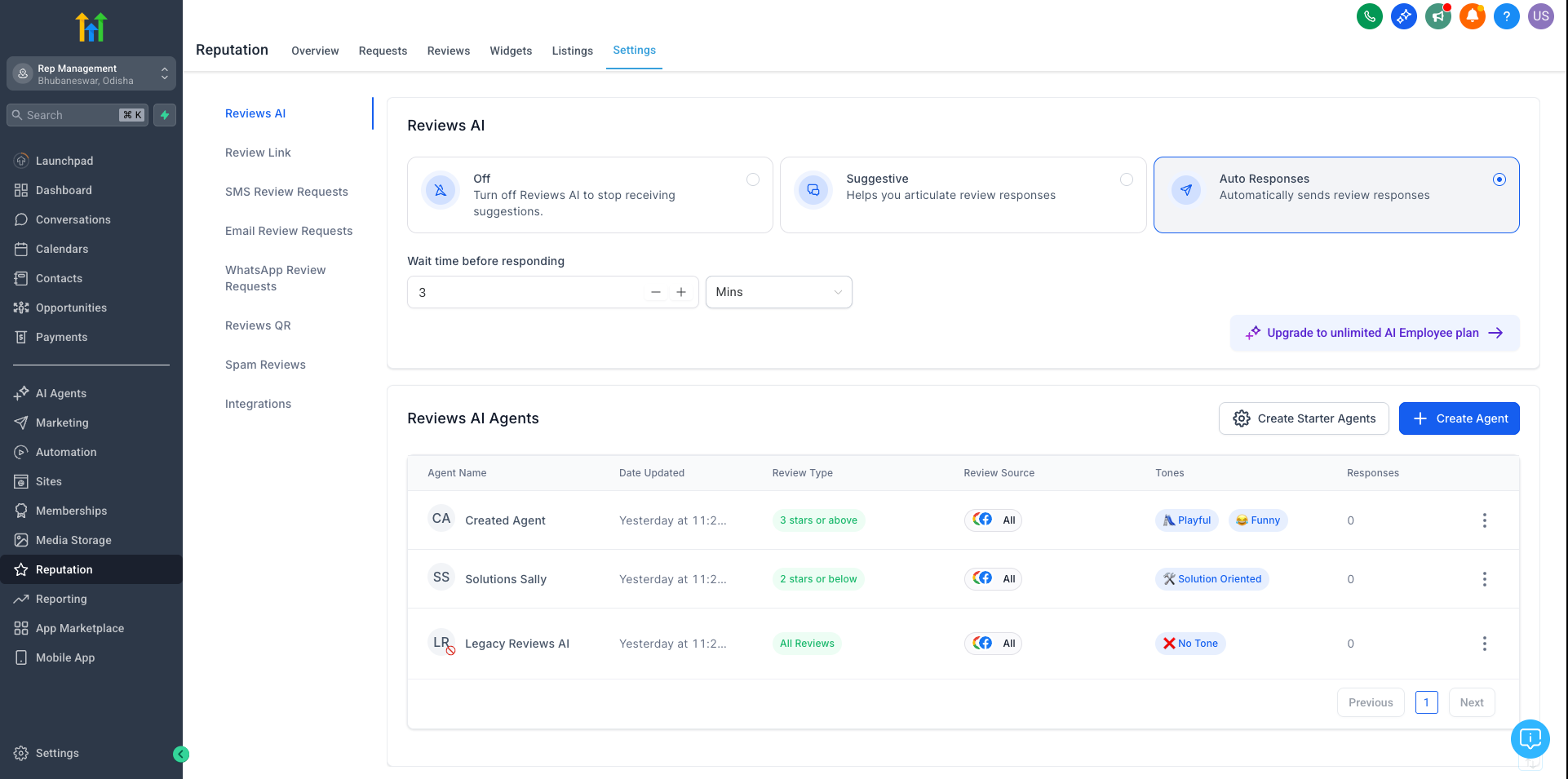
Enable Reviews AI
Configure tone and response preferences
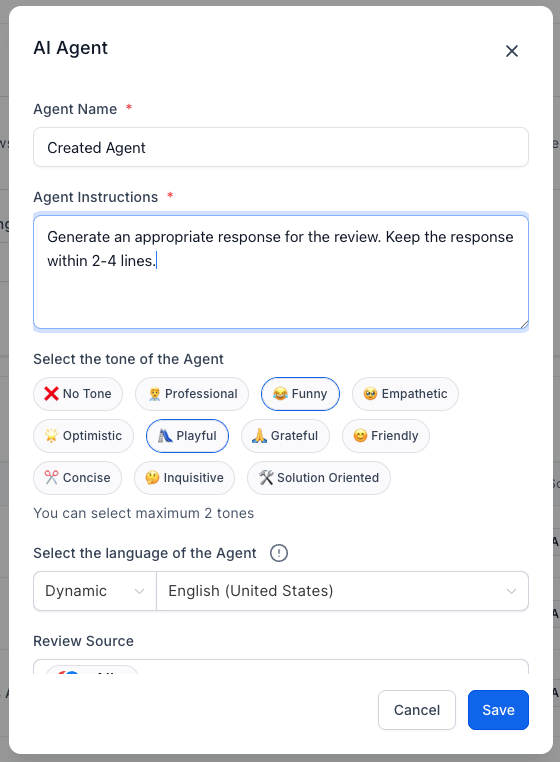
Add custom response guidelines (optional)
Save settings
Review AI-generated responses before publishing (if approval is required)
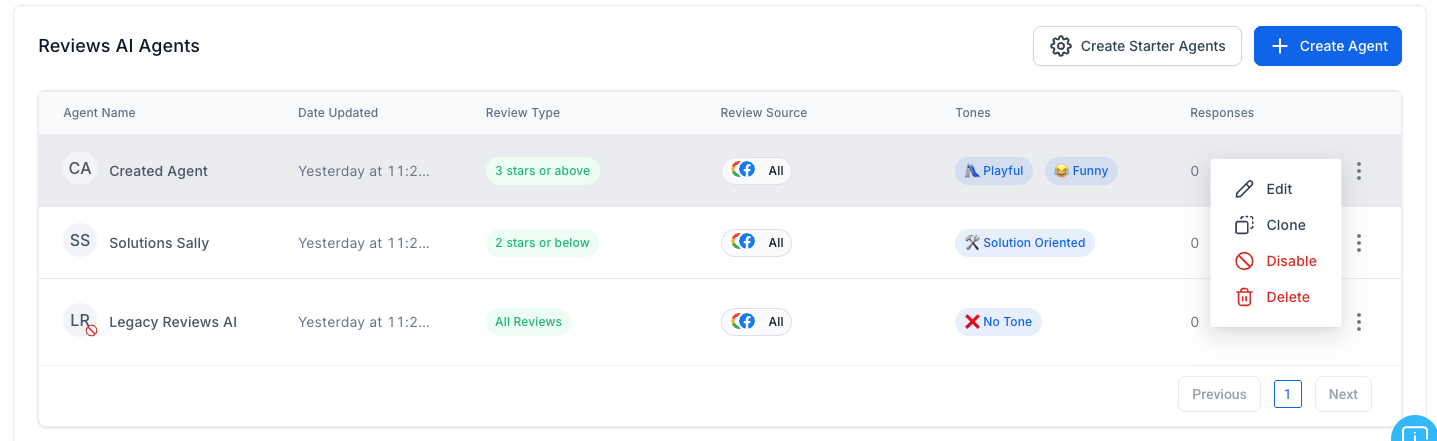
Once configured, the AI will begin generating responses for new incoming reviews.
Customizing Your AI Review Responses
To get the best results:
Define Your Brand Tone
Choose whether you want responses to sound formal, friendly, professional, or conversational.
Add Custom Instructions
Provide specific guidance such as:
Mentioning your business name
Including a call-to-action
Offering support contact information
Avoiding certain phrases
Monitor Negative Reviews Closely
For critical feedback, consider reviewing responses manually before publishing.
Best Practices for Review Automation
Always review AI-generated responses during the initial setup phase
Ensure compliance with platform policies
Personalize responses when appropriate
Monitor trends in customer feedback
Use reviews as an opportunity to improve service
AI should enhance your reputation strategy — not replace human oversight entirely.
Who Should Use Reviews AI Agents?
Reviews AI is ideal for:
Local businesses
Multi-location brands
Marketing agencies managing client accounts
Service-based businesses
High-volume review environments
If your team spends significant time responding to online reviews, this feature can dramatically increase efficiency.
Scale Your Reputation Management
With Reviews AI Agents inside Unlimited Digital Marketing, you can automate thoughtful review responses while maintaining full control over your brand image.
If you don’t have an account yet, sign up for a free trial here:
👉 https://UnlimitedDigitalMarketing.com
Start managing your online reputation smarter today.

