
How to Use the Workflow AI Builder
The Workflow AI Builder inside app.ajaxunion.com transforms the way you create automation. Instead of manually building workflows step by step, you can now describe what you want to accomplish — and AI will generate a structured automation sequence for you.
This feature helps agencies and businesses save time, reduce setup errors, and launch campaigns faster using intelligent automation assistance.
What Is the Workflow AI Builder?
The Workflow AI Builder is an AI-powered assistant designed to automatically generate workflows based on your goals. Simply explain the outcome you want — such as nurturing leads, booking appointments, or following up with prospects — and the system will create a ready-to-edit workflow blueprint.
From there, you can customize triggers, conditions, messages, and actions to fit your specific business needs.
Why Use the Workflow AI Builder?
Instead of building automations from scratch, the AI Builder allows you to:
Create workflows faster
Reduce manual configuration time
Get structured automation suggestions instantly
Improve campaign consistency
Launch follow-up systems quickly
Customize AI-generated flows before publishing
This makes it especially valuable for agencies managing multiple clients or businesses scaling their marketing operations.
How to Access the Workflow AI Builder
To begin using this feature:
Log in to your account at app.ajaxunion.com
Navigate to Automation → Workflows
Click Create Workflow
Select the AI Builder option
Describe the workflow you want to create
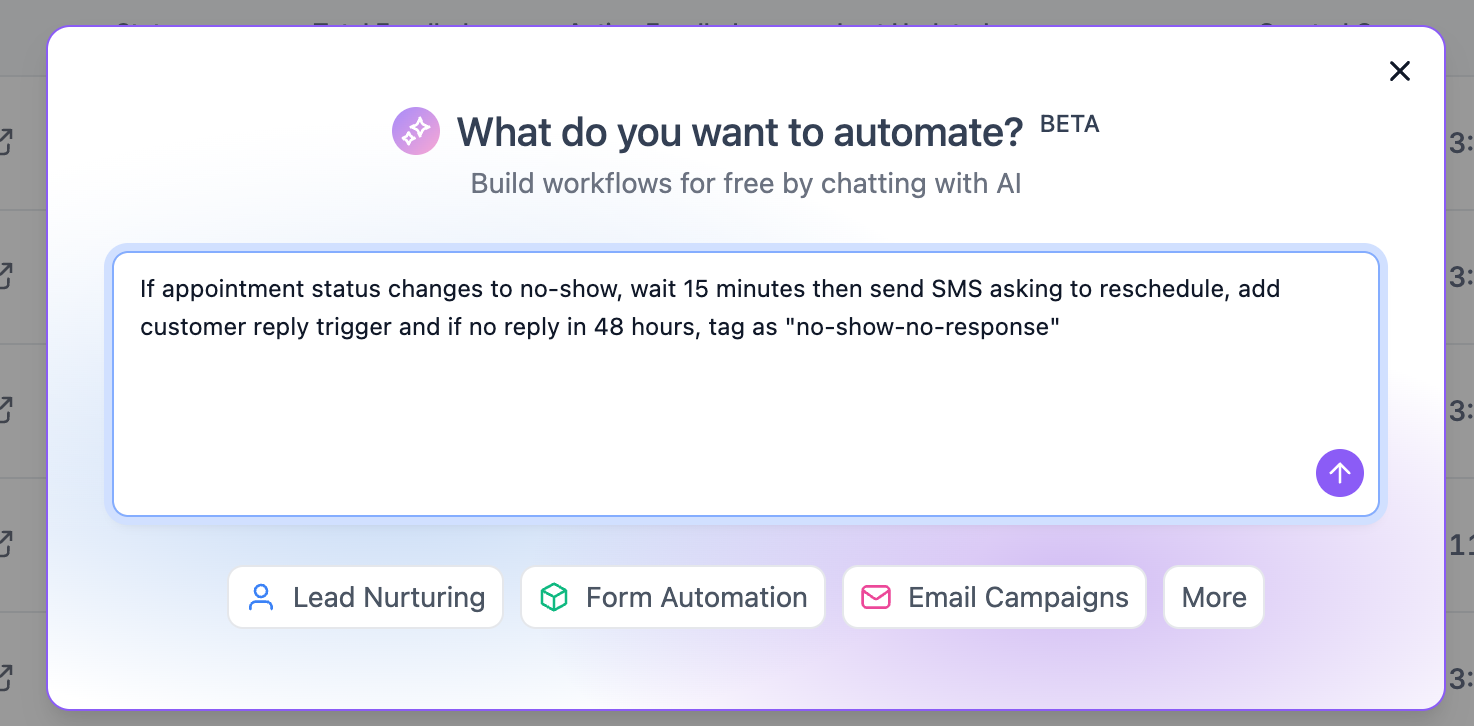
Review the generated automation structure
Edit, refine, and publish when ready
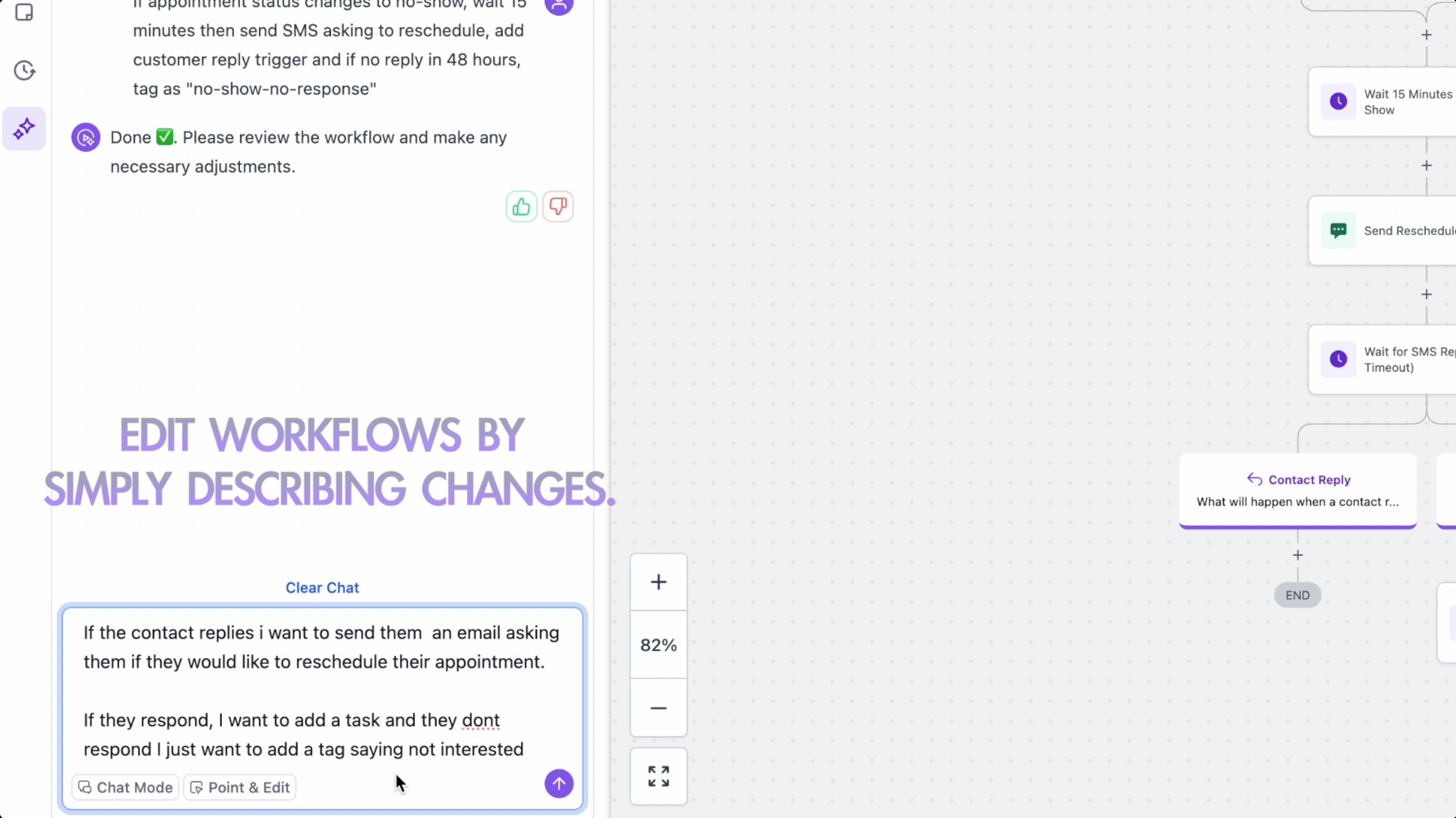
The AI will generate a draft workflow that includes triggers, actions, and suggested messaging steps based on your request.
Best Practices for Better AI-Generated Workflows
To get the most accurate results, follow these tips:
Be Specific With Your Instructions
Instead of saying “create a follow-up workflow,” try:
“Create a lead follow-up workflow that sends an SMS immediately, waits 1 day, sends an email, and creates a task if there is no response.”
The more detailed your request, the more refined your workflow will be.
Review Before Publishing
AI provides a strong starting framework, but always review timing, messaging tone, and logic before pushing live.
Customize Messaging
Adjust email and SMS copy to reflect your brand voice and compliance standards.
Test Before Activating
Run internal tests to ensure triggers and automation steps function as expected.
What Can You Build With Workflow AI Builder?
Here are common use cases:
Lead nurturing campaigns
Appointment booking sequences
Missed call text-back automations
Sales pipeline follow-ups
Client onboarding workflows
Review request campaigns
Re-engagement campaigns
Internal notification systems
The flexibility allows you to automate nearly any business process within Unlimited Digital Marketing.
How It Improves Productivity
The Workflow AI Builder dramatically reduces the time spent building automation from scratch. Instead of manually configuring each action and delay, you receive a structured framework in seconds.
This allows you to:
Launch campaigns faster
Improve response speed to new leads
Standardize automation processes
Reduce setup mistakes
Scale automation across multiple accounts
For agencies, this means faster client onboarding and more consistent results.
When Should You Use AI Builder vs Manual Setup?
Use AI Builder when:
You need a quick starting structure
You’re building a common campaign type
You want automation suggestions
Build manually when:
You need highly customized branching logic
You’re modifying an existing complex workflow
You require advanced conditional rules
Many users combine both methods — generating the base structure with AI and refining it manually.
Ready to Automate Smarter?
The Workflow AI Builder inside app.ajaxunion.com helps you eliminate guesswork, speed up automation setup, and scale your marketing systems efficiently.
If you don’t have an account yet, sign up for a free trial here:
👉 https://UnlimitedDigitalMarketing.com
Start building smarter automation today.

