
uNLIMITED DIGITAL MARKETING SUPPORT AND TECHNOLOGY
Do you want access to the most powerful digital marketing solution available for your business? Unlock limitless growth potential with our comprehensive digital marketing solution and expert support
Fill out the form below to get started!
WHAT YOU'LL GET

Unlimited Support
Gain access to unlimited support coupled with expert guidance to navigate our marketing technology seamlessly. Never feel stranded again as our team stands ready to assist you at every turn.

Comprehensive CRM Integration
Easily centralize your contacts with our CRM integration, including automatic LinkedIn imports. Track interactions across all platforms for targeted engagement strategies.

Autonomous AI Agents
Deploy agents that go beyond chat to manage pipelines and trigger complex workflows. These digital workers execute multi-step tasks 24/7, ensuring no lead is missed while autonomously scaling your operations to meet every business goal.

Industry-Specific Snapshots & Prebuilt Tools
Our platform comes with pre-built, customizable snapshots by industry loaded with automations, templates, and tools so you have begin putting our system to work on day one.

Powerful Email Marketing Tools
Utilize our robust email marketing technology to craft engaging campaigns and automate follow-ups. Maximize audience engagement and conversion rates with powerful tools designed to deliver results.

Autonomous AI Engagement
Deploy 24/7 agents that handle complex conversations and lead nurturing. These systems autonomously sync with your CRM and execute follow-up workflows, turning inquiries into sales-ready opportunities without human intervention.

Limitless Marketing Reach with Funnels
Create unlimited marketing funnels and materials effortlessly with our intuitive interface and customizable templates. Scale your outreach efforts exponentially and capture leads with ease.
MARKETING TECHNOLOGY FEATURES
Social Media Scheduling: Schedule social media across all major channels and have unlimited recurring posts
CRM & Pipeline Management: Track leads, manage customer relationships, and monitor sales pipelines in one place.
Automated Follow-Ups: Create custom workflows for email, SMS, and call reminders to engage prospects effortlessly.
Smart Workflow Automation: Automate lead routing and pipeline updates using AI that triggers personalized follow-ups based on real-time prospect sentiment.
Custom Chatbots: Qualify leads and answer inquiries 24/7 with AI-powered chat solutions.
Multi-Channel Marketing: Run email campaigns, text messages (SMS), and social media ads from a single platform.
Landing Page Builder: Design high-converting pages with drag-and-drop tools and customizable templates.
Appointment Scheduling: Allow customers to book directly into your calendar with automated reminders.
Review Management: Generate, track, and respond to customer reviews to boost online reputation.
Payment Processing: Accept payments seamlessly through the platform.
Industry-Specific Marketing Tools
Our platform comes with pre-built, customizable snapshots ready to use.
Unlimited Integrations: Compatable with Make.com and Zapier for unlimited integrations and AI automations.
Call Tracking & Recording: Monitor call performance and record important conversations for training and analysis.
AI Booking Agents: Deploy autonomous agents to qualify leads and book meetings directly into your calendar via SMS and DM 24/7.
Analytics Dashboard: Access real-time reporting on campaign performance and business metrics, including advertising reporting via Meta and Google.
Membership & Course Hosting: Create and sell online courses or membership programs directly through the system.
Lead Nurturing Funnels: Build automated sequences to turn cold leads into loyal customers.
Unlimited Users: Add your entire team to collaborate without additional licensing fees.
Mobile App: Manage your business on the go with the iOS and Android mobile apps.
Dedicated Support: Get expert assistance to help you maximize platform features.
WHO IS THIS FOR?
This plan is ideal for any business owner or marketing team looking to elevate their marketing efforts to the next level.
Whether you're a startup seeking growth or an established enterprise aiming for expansion, our Unlimited Digital Marketing support and technology are tailored to meet your needs.
If you desire to upgrade your marketing strategies while having dedicated support every step of the way, this plan is perfect for you.


Turn Structured Data Into Searchable Intelligence with Knowledge Base Tables
Turn Structured Data Into Searchable Intelligence with Knowledge Base Tables
Your AI Employee becomes significantly more powerful when it can reference structured data. With Knowledge Base Tables inside Unlimited Digital Marketing, you can upload CSV files and allow your AI Agents to search, interpret, and respond using real tabular data — all through natural conversation.
Instead of relying solely on documents or web pages, your AI can now understand customer lists, inventory records, transaction logs, KPIs, and more.
What Are Knowledge Base Tables?
Knowledge Base Tables allow you to upload CSV files directly into your AI Knowledge Base. Once uploaded, the system intelligently indexes each record so your AI Agents can answer questions about the data in plain English.
Rather than depending on keyword matches, the platform uses semantic search technology. This means your AI understands the meaning behind a question and returns context-aware results from the most relevant rows and columns.
For example, you can ask:
“Which customers have overdue invoices?”
“Show me orders that shipped overnight last week.”
“Which clients complained about billing?”
No formulas. No filters. No SQL queries required.
Why Use Knowledge Base Tables?
Natural-Language Data Queries
Ask everyday questions about your data and receive accurate, meaningful responses instantly.
Intelligent Semantic Matching
The system analyzes context and intent, not just exact words, to return the most relevant records.
Large Data Support
Upload CSV files with:
Up to 50,000 rows
Up to 500 columns
Up to 50 MB file size
Select the 20 most relevant columns for indexing
Structured Data Access
Tables allow your AI to reference structured information that traditional documents and webpages don’t capture effectively.
Enhanced AI Employee Capabilities
Empower your AI Agents to handle:
Customer records
Product catalogs
Order history
Financial metrics
Operational data
Internal reporting
How to Set Up Knowledge Base Tables
Follow these steps to connect your data:
Navigate to AI Agents → Knowledge Base.
Open an existing Knowledge Base or create a new one.
Click Add Source and choose Tables.
Upload your CSV file using drag-and-drop or file selection (maximum 50 MB).
Review the detected columns and adjust data types if needed.
Click Done to begin indexing. A progress indicator will show processing status.
Attach the Knowledge Base to your AI Agent (Chat, Voice, or Workflow AI).
Test with a sample question to confirm accurate results.
Once indexing is complete, your AI can immediately begin answering data-based questions.
CSV File Requirements
To ensure a successful upload, follow these guidelines:
File Format: .csv (UTF-8 encoding recommended)
Maximum Size: 50 MB
Row Limit: 50,000 rows per upload
Column Limit: 500 columns (choose up to 20 for indexing)
Header Row: The first row must contain column names
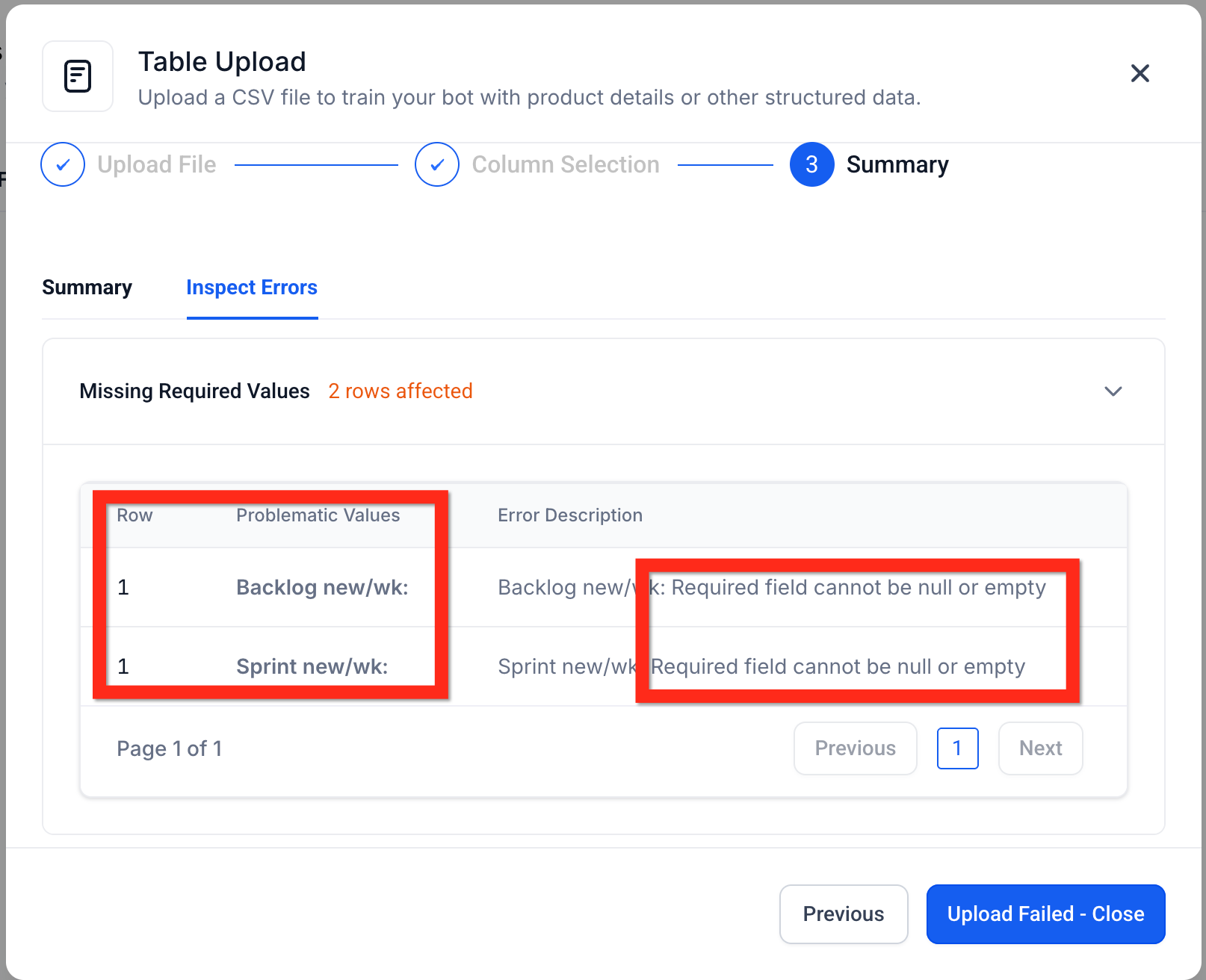
Clean Data: Remove empty values, merged cells, hidden formulas, and formatting artifacts
The system automatically detects column data types (text, number, date, etc.) with high accuracy. However, if a file is rejected, review it in a spreadsheet program or text editor to correct formatting issues before re-uploading.
How Semantic Search Works
Behind the scenes, each table row is converted into vector embeddings. This allows the AI to interpret meaning rather than match exact phrases.
When a user asks a question, the system compares it to indexed row groups and retrieves the most contextually similar matches. This process enables intelligent responses without requiring technical query language.
Smart Table Processing
To ensure speed and accuracy, the system:
Automatically detects column data types
Groups rows into optimized chunks for indexing
Stores metadata so responses can reference the correct records
Connects answers directly to the relevant data source
This architecture ensures your AI responses are both fast and verifiable.
Frequently Asked Questions
Can I upload Excel (.xlsx) files?
Excel files must be exported or saved as CSV format before uploading.
How long does indexing take?
Most files are processed within a few minutes. You’ll see a progress indicator during indexing.
Can I apply filters or sorting in questions?
Advanced filtering and sorting capabilities are expanding. For now, you can refine results by asking follow-up questions.
Can I see which rows were used in the answer?
Yes. Referenced records are displayed so you can verify or update them as needed.
Can I limit table access to certain AI Agents?
Yes. Only AI Agents connected to the Knowledge Base containing the table can access that data.
How is sensitive data protected?
Table data follows the same security rules as your Knowledge Base. Only authorized users and linked AI Agents can access or query the information.
Ready to Automate Smarter?
The Workflow AI Builder inside app.ajaxunion.com helps you eliminate guesswork, speed up automation setup, and scale your marketing systems efficiently.
If you don’t have an account yet, sign up for a free trial here:
👉 https://UnlimitedDigitalMarketing.com
Start building smarter automation today.

HOW MUCH IS IT?
Our monthly subscription is just $249*, providing you with unlimited access to all features and support without any hidden fees. Try it FREE for 7 days!
Enjoy the flexibility to cancel or upgrade your subscription at any time, ensuring you get the most value out of your investment in comprehensive digital marketing support and cutting-edge technology.
*Some features have usage-based fees - learn about them here.
WATCH NOW
Unlimited Digital Marketing
Marketing Automation Workshop Replay
Learn how our software can help you start nurturing your prospects and grow your business from the top of the funnel to the bottom line.
In this video you’ll learn:
Easy ways to organize your contacts and communicate better.
Simple methods for creating and handling social media posts.
Time-saving automation to make nurturing leads easier.
Ways to manage reviews and boost your company's reputation.
TAKE THE NEXT STEP TOWARDS DIGITAL MARKETING SUCCESS
Ready to revolutionize your marketing efforts?
Fill out the form below to access unlimited support, cutting-edge technology, and expert guidance.
Get started today for $249/mo or $2,490/yr with a FREE 7-day trial.
Additional Resources
Authority Blueprint
In this highly personalized process, we create an optimized LinkedIn marketing strategy for you, optimize your LinkedIn profile, and produce a calendar of content ideas for you to update your LinkedIn on a daily basis—complete with copy to get you started!
evyAI LinkedIn Assistant
Enhance your LinkedIn™ presence with evyAI,
a Chrome extension and a web app that supports your LinkedIn™ activities.
Create Personas, generate ideas, craft posts and 10x your LinkedIn™ exposure and productivity.
Monthly Strategy Session
Join our free monthly strategy session to get expert feedback on your current B2B marketing approach. Learn actionable ways to attract more leads and generate high-quality referrals.