
uNLIMITED DIGITAL MARKETING SUPPORT AND TECHNOLOGY
Do you want access to the most powerful digital marketing solution available for your business? Unlock limitless growth potential with our comprehensive digital marketing solution and expert support
Fill out the form below to get started!
WHAT YOU'LL GET

Unlimited Support
Gain access to unlimited support coupled with expert guidance to navigate our marketing technology seamlessly. Never feel stranded again as our team stands ready to assist you at every turn.

Comprehensive CRM Integration
Easily centralize your contacts with our CRM integration, including automatic LinkedIn imports. Track interactions across all platforms for targeted engagement strategies.

Autonomous AI Agents
Deploy agents that go beyond chat to manage pipelines and trigger complex workflows. These digital workers execute multi-step tasks 24/7, ensuring no lead is missed while autonomously scaling your operations to meet every business goal.

Industry-Specific Snapshots & Prebuilt Tools
Our platform comes with pre-built, customizable snapshots by industry loaded with automations, templates, and tools so you have begin putting our system to work on day one.

Powerful Email Marketing Tools
Utilize our robust email marketing technology to craft engaging campaigns and automate follow-ups. Maximize audience engagement and conversion rates with powerful tools designed to deliver results.

Autonomous AI Engagement
Deploy 24/7 agents that handle complex conversations and lead nurturing. These systems autonomously sync with your CRM and execute follow-up workflows, turning inquiries into sales-ready opportunities without human intervention.

Limitless Marketing Reach with Funnels
Create unlimited marketing funnels and materials effortlessly with our intuitive interface and customizable templates. Scale your outreach efforts exponentially and capture leads with ease.
MARKETING TECHNOLOGY FEATURES
Social Media Scheduling: Schedule social media across all major channels and have unlimited recurring posts
CRM & Pipeline Management: Track leads, manage customer relationships, and monitor sales pipelines in one place.
Automated Follow-Ups: Create custom workflows for email, SMS, and call reminders to engage prospects effortlessly.
Smart Workflow Automation: Automate lead routing and pipeline updates using AI that triggers personalized follow-ups based on real-time prospect sentiment.
Custom Chatbots: Qualify leads and answer inquiries 24/7 with AI-powered chat solutions.
Multi-Channel Marketing: Run email campaigns, text messages (SMS), and social media ads from a single platform.
Landing Page Builder: Design high-converting pages with drag-and-drop tools and customizable templates.
Appointment Scheduling: Allow customers to book directly into your calendar with automated reminders.
Review Management: Generate, track, and respond to customer reviews to boost online reputation.
Payment Processing: Accept payments seamlessly through the platform.
Industry-Specific Marketing Tools
Our platform comes with pre-built, customizable snapshots ready to use.
Unlimited Integrations: Compatable with Make.com and Zapier for unlimited integrations and AI automations.
Call Tracking & Recording: Monitor call performance and record important conversations for training and analysis.
AI Booking Agents: Deploy autonomous agents to qualify leads and book meetings directly into your calendar via SMS and DM 24/7.
Analytics Dashboard: Access real-time reporting on campaign performance and business metrics, including advertising reporting via Meta and Google.
Membership & Course Hosting: Create and sell online courses or membership programs directly through the system.
Lead Nurturing Funnels: Build automated sequences to turn cold leads into loyal customers.
Unlimited Users: Add your entire team to collaborate without additional licensing fees.
Mobile App: Manage your business on the go with the iOS and Android mobile apps.
Dedicated Support: Get expert assistance to help you maximize platform features.
WHO IS THIS FOR?
This plan is ideal for any business owner or marketing team looking to elevate their marketing efforts to the next level.
Whether you're a startup seeking growth or an established enterprise aiming for expansion, our Unlimited Digital Marketing support and technology are tailored to meet your needs.
If you desire to upgrade your marketing strategies while having dedicated support every step of the way, this plan is perfect for you.


How to Use Pipelines to Manage Your Sales Process in Unlimited Digital Marketing
f you've ever lost track of a lead, missed a follow-up, or wondered where a deal stood in your process — Pipelines are the fix. Inside Unlimited Digital Marketing, Pipelines give you a visual map of every opportunity moving through your sales or service workflow, so you always know what's happening, what's stalled, and what needs attention next.
This guide covers what Pipelines are, how to set them up, how to manage stages, and how to get the most out of them for your business.
What Are Pipelines?
A Pipeline is a visual workflow that tracks leads, deals, or clients as they move through a defined series of stages — from first contact all the way to closed or onboarded. Each item in a Pipeline is called an Opportunity, and it moves from left to right as it progresses through your process.
Pipelines give your team a shared, consistent view of where every opportunity stands — no spreadsheets, no guesswork, no leads falling through the cracks.
You can access Pipelines inside Unlimited Digital Marketing by navigating to Opportunities → Pipelines from your sub-account.
Why Pipelines Matter for Your Business
A well-built Pipeline does more than organize your leads. It gives you real operational clarity across your entire sales or service process.
Visibility — See at a glance where every opportunity is in your workflow at any moment.
Consistency — Standardize how leads and clients move through your process so nothing gets skipped.
Efficiency — Automate follow-ups, task assignments, and reminders based on stage changes so your team focuses on high-value work.
Performance tracking — Monitor conversion rates, spot bottlenecks, and measure pipeline health over time.
Understanding Pipeline Stages
A Pipeline is made up of stages — each one representing a step in your sales or customer journey. Stages should be clearly defined and action-oriented, so your team always knows exactly what needs to happen before moving an opportunity forward.
The key principle: every stage should have a clear entry condition. For example, an opportunity should only move to Appointment Scheduled once a meeting is actually confirmed on the calendar — not just requested.
Example — Sales Pipeline:
Lead Capture — New inquiries from forms, calls, or chats
Qualification — Budget, need, and fit are confirmed
Appointment Scheduled — Discovery calls or demos are booked
Proposal / Negotiation — Offers are shared and discussed
Closing — Opportunity marked as Won or Lost
Example — Service Business Pipeline:
New Inquiry
Discovery Call Booked
Service or Package Selected
Payment Collected
Onboarding
These structures can be adapted to fit any industry — real estate, coaching, agency work, home services, and more.
How to Access and View Your Pipelines
Log in to your account at app.ajaxunion.com.
From your sub-account, go to Opportunities.
Click on Pipelines.
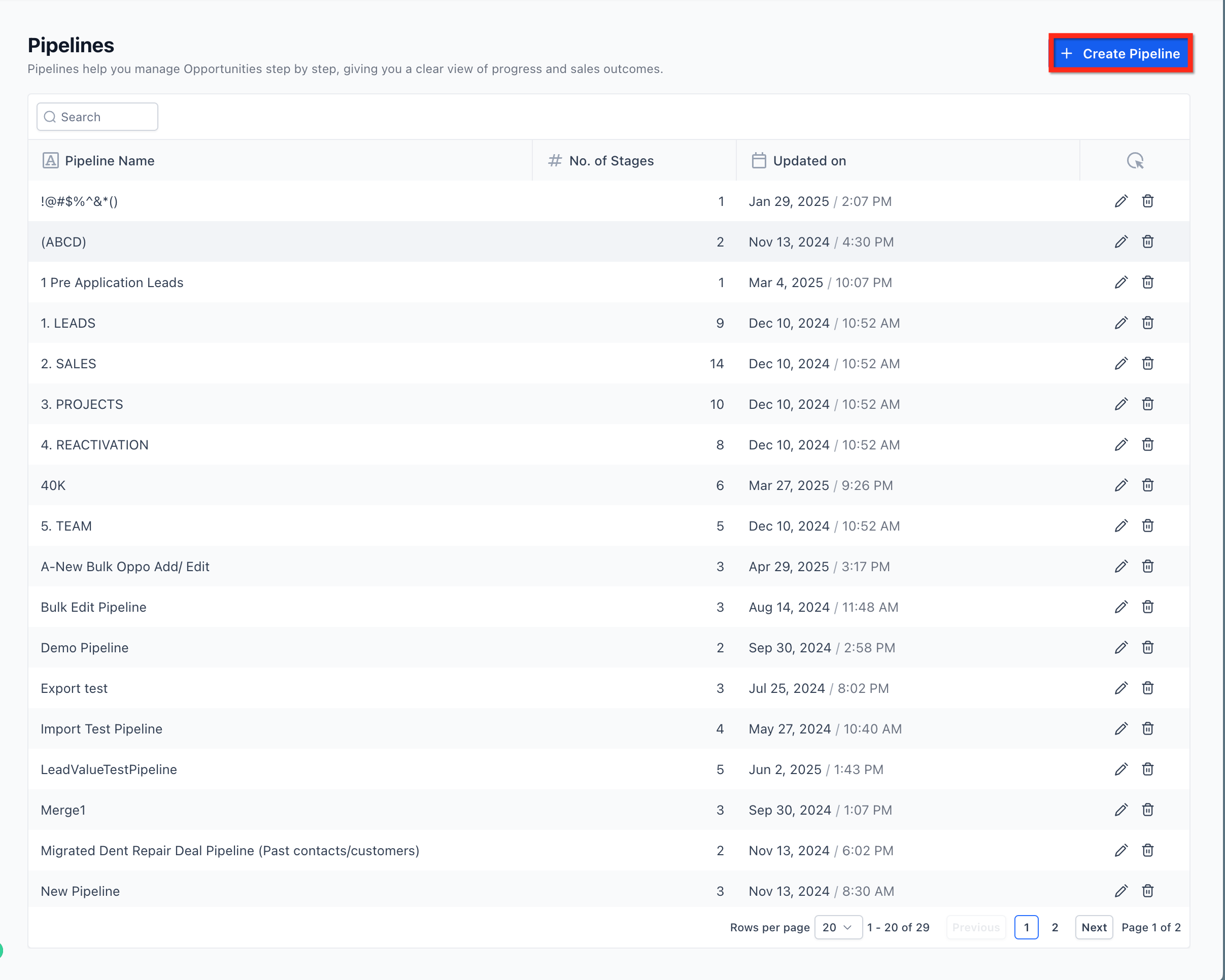
The Pipelines List View shows all pipelines in your sub-account, the number of stages in each, and when each pipeline was last updated. From here you can open any existing pipeline or create a new one.
How to Edit a Pipeline and Its Stages
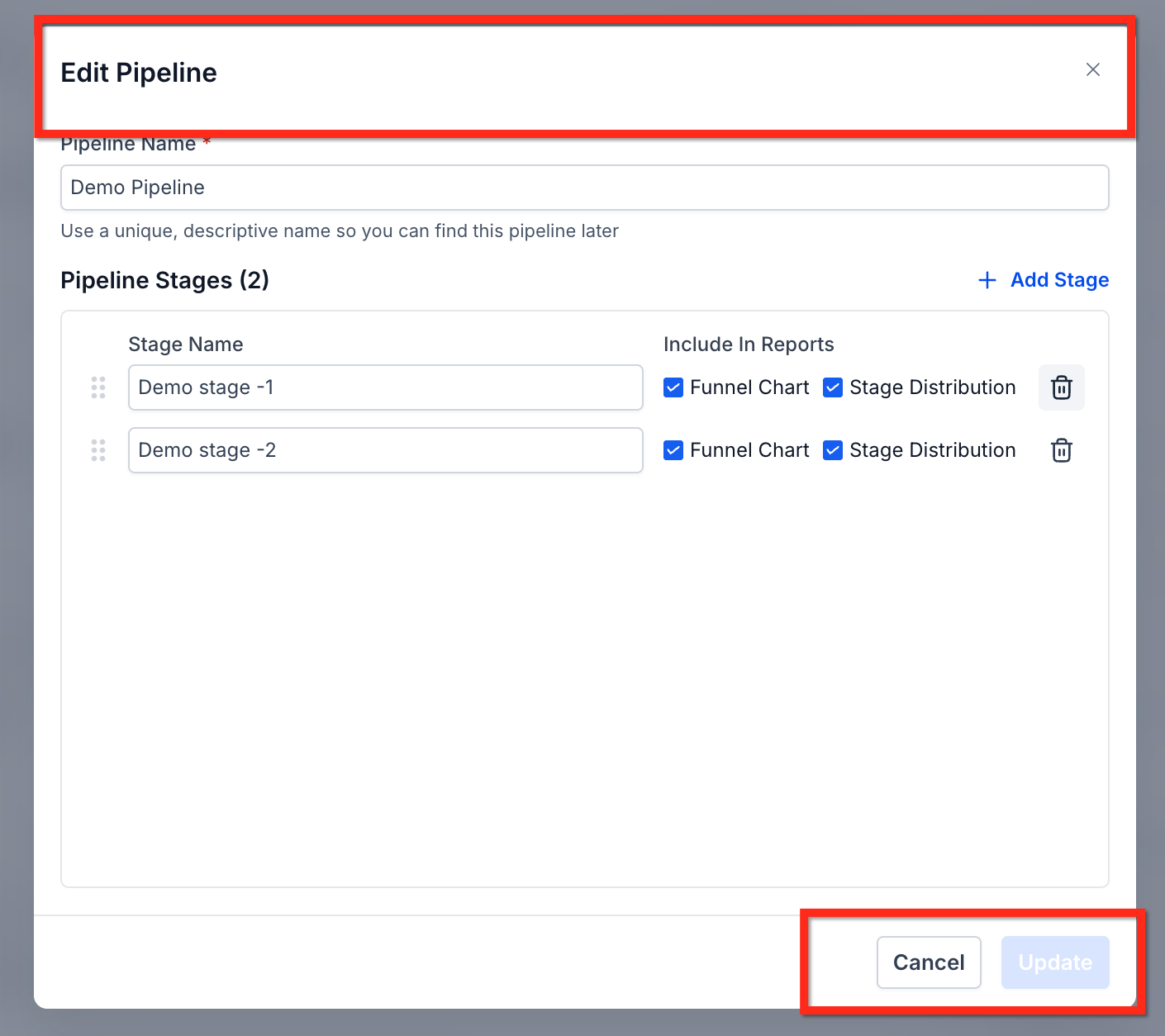
Inside any pipeline, you can rename stages, reorder them, control which stages appear in reporting, add new stages, or delete existing ones.
From the Pipelines list, open the pipeline you want to edit.
Use the stage editor to rename or reorder stages by dragging them into the right sequence.
Toggle reporting visibility on or off for individual stages as needed.
Click Save when your changes are complete.
Keep stage names short and action-oriented. Avoid vague labels like "In Progress" — instead use something specific like "Proposal Sent" or "Awaiting Signature" so anyone looking at the pipeline knows exactly where that opportunity stands.
How to Delete a Pipeline Stage Without Losing Opportunities
Removing a stage used to mean risking the loss of any opportunities sitting in it. That's no longer the case. When you delete a stage, you can now move all existing opportunities to another stage before the deletion is confirmed.
Navigate to Opportunities → Pipelines.
Open the pipeline you want to edit.
Click the delete icon next to the stage you want to remove.
Select a destination stage where existing opportunities should be moved.
Confirm the deletion.
All opportunities are automatically transferred to the stage you selected. Nothing is lost.
Best Practices for Building Effective Pipelines
Keep It Simple
Limit each pipeline to only the stages that reflect real decision points in your process. Too many stages create confusion and slow your team down. If a stage doesn't require a distinct action or decision, it probably doesn't need to exist.
Automate Smartly
Pipeline stages are powerful automation triggers inside Unlimited Digital Marketing. Use them to:
Send a follow-up message automatically when an opportunity has been in a stage for too long
Assign a task to a team member when a deal reaches a key stage
Trigger a notification when an opportunity is marked Won or Lost
Review Regularly
Set a recurring time — weekly or monthly — to:
Remove opportunities that are outdated or no longer active
Update stage definitions as your process evolves
Review conversion data to see where leads are dropping off
Use Data to Optimize
Pipelines aren't just organizational — they're analytical. Use pipeline reporting to answer questions like: which stage takes the longest to complete, where do opportunities drop off most often, and what's the win rate at each step? Let those answers drive how you refine your process over time.
Common Pipeline Structures by Industry
Your Pipeline structure should reflect how your business actually works. Here are a few starting points:
Real Estate: New Lead → Property Tour → Offer Made → Contract Signed → Closed
Coaching: Inquiry → Discovery Call → Program Selected → Payment → Onboarding
Agency: Lead → Strategy Call → Proposal → Agreement Signed → Client Onboarded
Start with the simplest version that covers your core workflow, then refine it as you learn where things slow down or fall through.
Frequently Asked Questions
Do I lose opportunities when I delete a pipeline stage?
No. When you delete a stage, you're prompted to choose a destination stage. All opportunities from the deleted stage are automatically moved there before the deletion is confirmed.
Can I have multiple pipelines in the same account?
Yes. You can create as many pipelines as you need — one for each service line, product, or client type. Each pipeline operates independently.
Can pipeline stage changes trigger automations?
Yes. Stage changes are one of the most powerful automation triggers available. You can build workflows that fire automatically whenever an opportunity moves into or out of any stage.
How many stages should a pipeline have?
There's no fixed number, but simpler is almost always better. Most effective pipelines have between four and eight stages. If you're finding it hard to decide which stage an opportunity belongs in, you probably have too many.
Can I reorder stages after a pipeline is already in use?
Yes. You can rename and reorder stages at any time from the pipeline editor. Reordering stages does not affect existing opportunities or automations.
Do automations built on pipeline stages keep working after I edit the pipeline?
Yes. Existing pipeline-based automations and triggers continue to function normally after edits. If you delete a stage that an automation references, review and update that automation to point to the correct stage.
Start Tracking Your Opportunities with Pipelines
A clear, well-structured Pipeline is one of the highest-leverage things you can build inside Unlimited Digital Marketing. It brings order to your sales process, makes follow-up automatic, and gives you the data you need to grow with confidence.
Log in to app.ajaxunion.com, go to Opportunities → Pipelines, and start building or refining your pipeline today. For more guides and platform tutorials, visit UnlimitedDigitalMarketing.com.

HOW MUCH IS IT?
Our monthly subscription is just $249*, providing you with unlimited access to all features and support without any hidden fees. Try it FREE for 7 days!
Enjoy the flexibility to cancel or upgrade your subscription at any time, ensuring you get the most value out of your investment in comprehensive digital marketing support and cutting-edge technology.
*Some features have usage-based fees - learn about them here.
WATCH NOW
Unlimited Digital Marketing
Marketing Automation Workshop Replay
Learn how our software can help you start nurturing your prospects and grow your business from the top of the funnel to the bottom line.
In this video you’ll learn:
Easy ways to organize your contacts and communicate better.
Simple methods for creating and handling social media posts.
Time-saving automation to make nurturing leads easier.
Ways to manage reviews and boost your company's reputation.
TAKE THE NEXT STEP TOWARDS DIGITAL MARKETING SUCCESS
Ready to revolutionize your marketing efforts?
Fill out the form below to access unlimited support, cutting-edge technology, and expert guidance.
Get started today for $249/mo or $2,490/yr with a FREE 7-day trial.
Additional Resources
Authority Blueprint
In this highly personalized process, we create an optimized LinkedIn marketing strategy for you, optimize your LinkedIn profile, and produce a calendar of content ideas for you to update your LinkedIn on a daily basis—complete with copy to get you started!
evyAI LinkedIn Assistant
Enhance your LinkedIn™ presence with evyAI,
a Chrome extension and a web app that supports your LinkedIn™ activities.
Create Personas, generate ideas, craft posts and 10x your LinkedIn™ exposure and productivity.
Monthly Strategy Session
Join our free monthly strategy session to get expert feedback on your current B2B marketing approach. Learn actionable ways to attract more leads and generate high-quality referrals.